UK BASED ∙ UK STOCK ∙ ESTABLISHED 2010
2 YEAR WARRANTY ∙ FAST DELIVERY
EXPERT TECHNICAL SUPPORT
09-FEB UGOOS AM6B+ BACK IN STOCK   30-JAN ZIDOO 8K FIRMWARE UPDATE 1.3.05   5-JAN ARYLIC LP10 ADDS QOBUZ CONNECT  
This forum was closed in October 2025 in response to sustained DDOS type attacks. It has been left up read-only to allow access to support information and downloads. Thanks to all the users who contributed over the years.

Visit futeko.com for new Audio and Video Media Players!

Author Topic: Q5/Q10 Pro Custom Firmware  (Read 1487959 times)

manley

  • Senior Member
  • ***
  • Posts: 126
Re: Q5/Q10 Pro Custom Firmware
« Reply #1260 on: September 10, 2019, 04:00:31 PM »
I have the latest custom firmware installed on my Q10 Pro box with the latest Kodi 18.4  installed  and am generally very pleased with the results including full 4K rips. Unfortunately one of my latest rips has frequent jerky screen movements which I haven't had before which led me to think it was a corrupt or poor rip. I then played the same file using a much cheaper 4K box, an X96 max on which I have installed the fps apk and this same file plays back flawlessly. Any idea why the playback using the Q10 is jerky?

Xenomorph

  • Newbie
  • *
  • Posts: 1
Re: Q5/Q10 Pro Custom Firmware
« Reply #1261 on: September 13, 2019, 03:24:43 PM »
update_Q30_(update&themed&Kodi18.2)[v1.2]-HMD-2.1.4 2019-05-31.153235
update_Q5Pro_(update&themed&Kodi18.2)[v1.2]-HMD-2.1.4 2019-06-04.100340
update_Q10Pro_(update&themed&Kodi18.2)[v1.2]-HMD-2.1.4 2019-05-31.171152


Changelog:
v1.2
- fix back screen over Wrapper + NFS
- add back VFD display clock on/off option on Android settings
v1.1
- reverse to HiMedia setting from v2.1.2 as new setting of v2.1.4 has some missing option
Thanks to @haovh_85 for report missing options.
v1.0
- follow HiMedia v2.1.4 OFW

Online on mediafire.

Note:
- Before try  backup, backup, backup, need more users to test and feedback.
- Dirty update maybe can apply between update CFW version, minor updates will not be problems.

Thanks for understanding and enjoy yours video collections.

I've installed the Firmware CFW/OFW 2.1.4 but the new Style of the startpage doesn't appears... :-\ How to solve this problem?

pcristi

  • Senior Member
  • ***
  • Posts: 1334
Re: Q5/Q10 Pro Custom Firmware
« Reply #1262 on: September 14, 2019, 10:23:58 PM »
update_Q10Pro-HMD-2.1.4 2019-07-15.155346
FW for Q10Pro with cherry pick from Q100 & Q10?? v2.1.4
Base/Launcher/My Apps form Q100 thanks to RiCo97
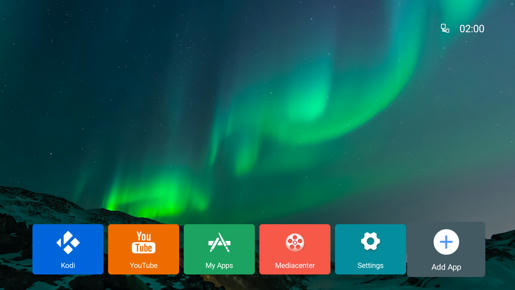
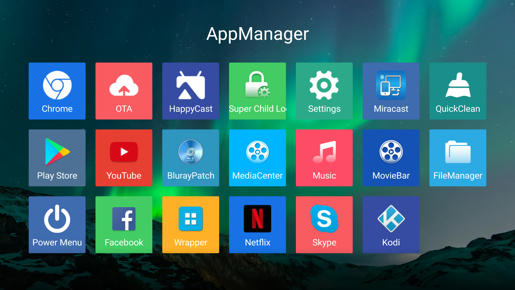


Wallposter, HiMediaVideoPlayer from Q10?? v2.1.4 thanks to haovh_85
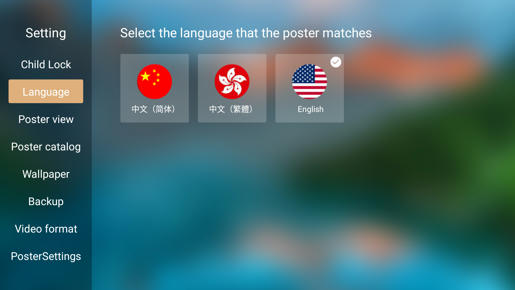
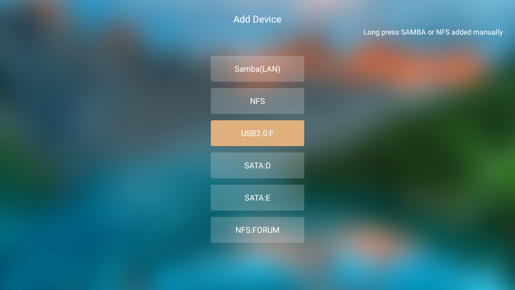

For Wallposter use MediaCenter for save SMB/NFS shortcut to see as device.

Note:
- backup, backup, backup all your sensitive data.
- only for testing propose and feedback if bug of NFS black screens is present.
- that FW is closer to HiMedia OFW for Q100 box and many CFW fixes are not included.

Download link here.

All feedback are welcome.

haovh_85

  • Full Member
  • **
  • Posts: 64
Re: Q5/Q10 Pro Custom Firmware
« Reply #1263 on: September 15, 2019, 07:41:56 AM »
Thank you so much, pcristi!

blueoceans

  • Newbie
  • *
  • Posts: 6
Re: Q5/Q10 Pro Custom Firmware
« Reply #1264 on: September 15, 2019, 11:17:39 AM »
Is there any chance to get this skin for Q5 pro?

pcristi

  • Senior Member
  • ***
  • Posts: 1334
Re: Q5/Q10 Pro Custom Firmware
« Reply #1265 on: September 15, 2019, 04:49:43 PM »
Is there any chance to get this skin for Q5 pro?

Small update.zip apply from menu on top of Q5Pro v2.1.4 will have closer results.

algernon2607

  • Newbie
  • *
  • Posts: 30
Re: Q5/Q10 Pro Custom Firmware
« Reply #1266 on: September 15, 2019, 07:45:08 PM »
Hello and thanks for that @Pcristi.

Only english for poster ??
 
Al


pcristi

  • Senior Member
  • ***
  • Posts: 1334
Re: Q5/Q10 Pro Custom Firmware
« Reply #1267 on: September 16, 2019, 08:44:55 AM »
@algernon2607
Wallposter read local poster.jpg, .nfo, etc. files with priority of scraping probably this can help with foreign languages.

blueoceans

  • Newbie
  • *
  • Posts: 6
Re: Q5/Q10 Pro Custom Firmware
« Reply #1268 on: September 16, 2019, 05:07:34 PM »
Is there any chance to get this skin for Q5 pro?

Small update.zip apply from menu on top of Q5Pro v2.1.4 will have closer results.

Thank you, I tried but for me is your CS-AK Custom Firmware the best.

turtlejay

  • Newbie
  • *
  • Posts: 17
Re: Q5/Q10 Pro Custom Firmware
« Reply #1269 on: September 20, 2019, 11:09:28 PM »
https://photos.app.goo.gl/6n7T1D8vvNHvEW5m9

I believe I have a cfw 2.0.9 as illustrated in the picture. Forgive my ignorance, I've always updated by pressing the reset button in the back on boot. Is that considered dirty? Or is it updating from the menus considered dirty. If o want to install this latest cfw what's the better option. I have had bricking issues in the past and would like to avoid them. I dont mind a wipe of the system as there's not much on here presently.

stl

  • Senior Member
  • ***
  • Posts: 649
Re: Q5/Q10 Pro Custom Firmware
« Reply #1270 on: September 21, 2019, 08:54:35 AM »
https://photos.app.goo.gl/6n7T1D8vvNHvEW5m9

I believe I have a cfw 2.0.9 as illustrated in the picture. Forgive my ignorance, I've always updated by pressing the reset button in the back on boot. Is that considered dirty? Or is it updating from the menus considered dirty. If o want to install this latest cfw what's the better option. I have had bricking issues in the past and would like to avoid them. I dont mind a wipe of the system as there's not much on here presently.

Pressing the reset button is the clean and preferred method.

vccy

  • Newbie
  • *
  • Posts: 3
Re: Q5/Q10 Pro Custom Firmware
« Reply #1271 on: September 22, 2019, 08:31:54 AM »
About

These firmwares are created voluntarily by forum user pcristi. Show your appreciation by buying him a...


All of pcristi's firmwares are available from his Mediafire account: https://www.mediafire.com/?kvlryqpyzcac3

Installation Instructions

The method is slightly different to our official firmware downloads. For these firmwares, you must rename the downloaded zip file to update.zip.

FIRMWARE INSTALL CAN TAKE UP TO 20 MINUTES. DO NOT POWER OFF DURING INSTALL. WAIT FOR THE HOME SCREEN TO APPEAR.

1. Rename firmware update .zip (e.g. update_Q(...)Pro_(...)_HMD-1.0.8(...).zip) to update.zip.
2. Copy update.zip to the root of a USB pen drive.
3. Insert the USB pen drive into any USB port of the Q10/Q5Pro.
4. With the Q10/Q5Pro turned off, use a paper clip or pen to press and hold the the pinhole restore button on the back side of the Q10/Q5Pro.
5. While keeping the RESTORE/UPGRADE button pressed, turn on the Q10/Q5Pro.
6. The Q10/Q5Pro will show an Android logo and proceed to upgrade the firmware.
7. The box will auto-reboot when finished.
8. First boot can take 4-5 minutes.
9. Wait 15 minutes after first boot to allow system and apps to initialise.

Q10 Pro + Q5 Pro
Seperate downloads for Q10 and Q5 Pro.
Make sure you select the correct one for your machine.
Read the instructions carefully.

*** pcristi Custom Firmware ***

Based on regular official firmware. Includes interface enhancements, updated apps, and some of the pcristi patches (e.g. Samba speed enhancement).

See individual forum entries for details.

2.1.4 [LATEST] Download + Info

Android 7: 2.1.4, 2.1.2, 2.1.1, 2.1.0, 2.0.8, 2.0.7, 2.0.6, 2.0.5, 2.0.4, 2.0.1

Android 5: 1.1.0, 1.0.9, 1.0.8, 1.0.7, 1.0.6, 1.0.3, 1.0.1

*** pcristi Android TV Custom Firmware ***

pcristi full Android TV OS firmware: pcristi Android TV firmware thread

*** CS-AK Custom Firmware ***

- Alkaid for idea, new design, icon pack.
- pcristi for scripts, testing, assembly.

More customised version of the pcristi firmware with different launcher interface and apps: CS-AK custom firmware thread

Hi I try to update my Q5 pro to the latest software but I failed to enter the android reboot system. I press and hold down the restore button and turn on himedia but still it boot to the home screen. I have tried to turn on using local button and remote control still the same. Any idea why?

Thanks

stl

  • Senior Member
  • ***
  • Posts: 649
Re: Q5/Q10 Pro Custom Firmware
« Reply #1272 on: September 22, 2019, 11:33:26 AM »
vccy, you're doing something wrong with the usb flash drive or the update file on it.
Be sure to update the correct version depending on the version you have installed right now.

vccy

  • Newbie
  • *
  • Posts: 3
Re: Q5/Q10 Pro Custom Firmware
« Reply #1273 on: September 22, 2019, 03:19:28 PM »
vccy, you're doing something wrong with the usb flash drive or the update file on it.
Be sure to update the correct version depending on the version you have installed right now.

Hi stl

Did this firmware need to put into a clean pendrive? Cos my pendrive got other things inside it together. Btw I am upgrading to android 7.

stl

  • Senior Member
  • ***
  • Posts: 649
Re: Q5/Q10 Pro Custom Firmware
« Reply #1274 on: September 22, 2019, 05:19:52 PM »
vccy, you're doing something wrong with the usb flash drive or the update file on it.
Be sure to update the correct version depending on the version you have installed right now.

Hi stl

Did this firmware need to put into a clean pendrive? Cos my pendrive got other things inside it together. Btw I am upgrading to android 7.

I'm not sure because every time I've upgraded I only had the file update.zip on it.
You can't upgrade directly to the latest version from Android 5. I recommend you install the official firmware to the latest version and finally install the custom firmware. The instructions in the official firmware topic are better, follow them or you will brick your box.


DELIVERY ∙ PAYMENT ∙ WARRANTY+RETURNS ∙ INTERNATIONAL TAX ∙ ABOUT ∙ PRIVACY ∙ NEWS ∙ CONTACT
© SDHDIGITAL LTD 2026
SITEMAP


