UK BASED ∙ UK STOCK ∙ ESTABLISHED 2010
2 YEAR WARRANTY ∙ FAST DELIVERY
EXPERT TECHNICAL SUPPORT
09-FEB UGOOS AM6B+ BACK IN STOCK   30-JAN ZIDOO 8K FIRMWARE UPDATE 1.3.05   5-JAN ARYLIC LP10 ADDS QOBUZ CONNECT  
This forum was closed in October 2025 in response to sustained DDOS type attacks. It has been left up read-only to allow access to support information and downloads. Thanks to all the users who contributed over the years.

Visit futeko.com for new Audio and Video Media Players!

Author Topic: Q5/Q10 Pro Custom Firmware  (Read 1487849 times)

DMD

  • Senior Member
  • ***
  • Posts: 310
Re: Q5/Q10 Pro Custom Firmware
« Reply #1335 on: June 27, 2020, 01:56:45 PM »
I apologize if I'm wrong.
In my version of Windows it is still possible to format in FAT 32.
In which version of Windows is it not possible to do this?
Thank you

« Last Edit: June 27, 2020, 04:40:15 PM by DMD »

laager

  • Full Member
  • **
  • Posts: 65
Re: Q5/Q10 Pro Custom Firmware
« Reply #1336 on: June 28, 2020, 02:14:24 PM »
In which version of Windows is it not possible to do this?
All Win 10, when using larger than 32GB.

DMD

  • Senior Member
  • ***
  • Posts: 310
Re: Q5/Q10 Pro Custom Firmware
« Reply #1337 on: June 28, 2020, 03:08:14 PM »
In which version of Windows is it not possible to do this?
All Win 10, when using larger than 32GB.
OK.
I understood that the limitation also concerned USB pen drives, less than 32 Gb.

Q10pro

  • Newbie
  • *
  • Posts: 1
Re: Q5/Q10 Pro Custom Firmware
« Reply #1338 on: July 21, 2020, 05:25:37 PM »
I just local upgrade to ATV Firmware, but i need to rollback to Official Firmware, how to do

Thank you
Recovery with paper clip.
1. Copy update.zip to the root of a USB pen drive.
2. Insert the USB pen drive into any USB port of the Q10Pro/Q5Pro.
3. With the Q10Pro/Q5Pro turned off, use a paper clip to press and hold the the pinhole restore button on the back side of the Q10Pro/Q5Pro.
4. While keeping the RESTORE/UPGRADE button pressed, turn on the Q10Pro/Q5Pro.
5. The Q10Pro/Q5Pro will show an Recovery Rainbow Rings logo and proceed to upgrade the firmware.
6. The box will auto-reboot few times until finished.
7. First boot can take 4-5 minutes.
8. Wait 15 minutes after first boot to allow system and apps to initialize.


Hi
Isnthere any way to disable remove adaway patching?
Thanks in advance

pcristi

  • Senior Member
  • ***
  • Posts: 1334
Re: Q5/Q10 Pro Custom Firmware
« Reply #1339 on: July 21, 2020, 07:58:14 PM »
adb shell
Code: [Select]
adb connect <ip_player>
adb root
adb connect <ip_player>
adb remount
adb shell "echo '127.0.0.1       localhost \n::1             ip6-localhost' > /system/etc/hosts"
adb reboot

pcristi

  • Senior Member
  • ***
  • Posts: 1334
Re: Q5/Q10 Pro Custom Firmware
« Reply #1340 on: August 03, 2020, 08:13:05 AM »
update_Q30_(update&themed&Kodi18.2)[v1.4]-HMD-2.1.6 2020-07-17.151732
update_Q5Pro_(update&themed&Kodi18.2)[v1.4]-HMD-2.1.6 2020-07-13.142334
update_Q10Pro_(update&themed&Kodi18.2)[v1.4]-HMD-2.1.6 2020-07-13.172553
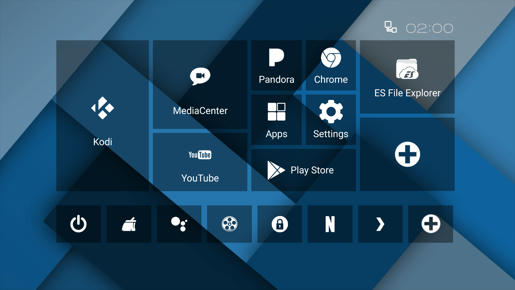


Changelog:

v1.3
- fix VPN settings crash.
v1.3
- fix Media Center LAN share list.
v1.2
- version bump.
v1.1 (repack)
- HiMediaVideoPlayer 1.2.45
- CEC support for power control
- Control of hide navigation bar, default hidden
   (Settings/Display/Close the system navigation bar).
v1.0
- minor fixes
- release Q30 build
- change Backdrop to v1.4.4
- update Calendar, DeskClock, Phonesky, PrebuiltGmsCore
- add more then 900 white icons from original icon pack.
  Thanks to developer Randle.
Note: if enjoy RC0 are not rezone to update to v1.0.

RC0
- follow HiMedia OFW v2.1.6
- some users application updated
- long press Home button open recent apps
  (Thanks to xam1988 for smali cod)
- fully support for boxes with newest PCB 2.2.

Download link here.
Recommendation of installed with paperclip.
Requirements OFW v2.1.6 to be or was installed on box.





« Last Edit: September 17, 2020, 10:25:59 AM by pcristi »

HereIsTom

  • Senior Member
  • ***
  • Posts: 281
  • Sony 55A89 Android TV
    • Cybershot Photo Website!
Re: Q5/Q10 Pro Custom Firmware
« Reply #1341 on: August 03, 2020, 09:13:13 AM »
Thanks pcristi, but require OFW 2.1.6 where can we find that?

manley

  • Senior Member
  • ***
  • Posts: 126
Re: Q5/Q10 Pro Custom Firmware
« Reply #1342 on: August 03, 2020, 12:27:59 PM »
https://www.mediafire.com/?58akd6hjzv5ga

Above link shows the v2.1.6  firmwares

Henry_NL

  • Newbie
  • *
  • Posts: 47
Re: Q5/Q10 Pro Custom Firmware
« Reply #1343 on: August 03, 2020, 01:07:45 PM »
Hi pcristi, just to be sure these sanity check questions:
1. Currently I use the update_Q10Pro_(Lite-CFW)-HMD-2.1.4 2019-09-11.161658. Can i directly upgrade from this firmware to the update_Q10Pro_(update&themed&Kodi18.2)[RC0]-HMD-2.1.6 2020-07-13.172553.zip?
2. The zip in your mediafire dir CFW HMD 2.1.6 is equally named to the one in the dir Official FW (untouched), BUT  I assume that the one in CFW HMD 2.1.6 is the most actual and to be used version. Please confirm and thanks.

Update: I understand from other comments below now, fist update using paperclip with ofw 216 and than this updated cfw 216.
« Last Edit: August 03, 2020, 08:42:25 PM by Henry_NL »

HereIsTom

  • Senior Member
  • ***
  • Posts: 281
  • Sony 55A89 Android TV
    • Cybershot Photo Website!
Re: Q5/Q10 Pro Custom Firmware
« Reply #1344 on: August 03, 2020, 01:09:33 PM »
https://www.mediafire.com/?58akd6hjzv5ga

Above link shows the v2.1.6  firmwares

Thank you! 👍

nandish

  • Full Member
  • **
  • Posts: 75
Re: Q5/Q10 Pro Custom Firmware
« Reply #1345 on: August 03, 2020, 02:46:10 PM »
I'm just after installing on Q10 Pro. Thank you pcristi, good job as always. Works perfectly

manley

  • Senior Member
  • ***
  • Posts: 126
Re: Q5/Q10 Pro Custom Firmware
« Reply #1346 on: August 03, 2020, 07:33:41 PM »
I'm not sure if its just me or not but I don't think this new custom firmware 2.1.6 with Kodi 18.2 looks quite as good as my previous  2.1.4 custom firmware where I used Kodi 18.7, I find the picture is not so vibrant as before lacking a bit of colour, all the settings were the same for both firmwares, anyone else found this?

snap

  • Newbie
  • *
  • Posts: 31
Re: Q5/Q10 Pro Custom Firmware
« Reply #1347 on: August 03, 2020, 07:46:06 PM »
Works fine here too.

jcp2

  • Newbie
  • *
  • Posts: 45
Re: Q5/Q10 Pro Custom Firmware
« Reply #1348 on: August 03, 2020, 07:47:53 PM »
I was able to install magisk on official 2.1.6 using pcristi's Magisk_v19.3_-root_%26_Universal_Systemless_Interface_FW_v2.1.4.  But it won't install on CFW 2.1.6. Is there a way to root?  I need root for Titanium Backup. Thanks,  John

pcristi

  • Senior Member
  • ***
  • Posts: 1334
Re: Q5/Q10 Pro Custom Firmware
« Reply #1349 on: August 03, 2020, 09:15:09 PM »
Doesn't need to be differences between OFW and CFW, but as alternative root can try ROOT_SuperSU_v2.82_SR5_via_LAN.


DELIVERY ∙ PAYMENT ∙ WARRANTY+RETURNS ∙ INTERNATIONAL TAX ∙ ABOUT ∙ PRIVACY ∙ NEWS ∙ CONTACT
© SDHDIGITAL LTD 2026
SITEMAP

