FAST DELIVERY ∙ EXPERT TECH SUPPORT
UK STOCK ∙ 2 YEAR WARRANTY
❄ CHRISTMAS OPENING TIMES ❄  ∙  ❄ ARYLIC LP10 LOSSLESS AUDIO STREAMER @  ❄
This forum was closed in October 2025 in response to sustained DDOS type attacks. It has been left up read-only to allow access to support information and downloads. Thanks to all the users who contributed over the years.

Visit futeko.com for new Audio and Video Media Players!

Author Topic: How to "Safely Remove USB device", such as HDD or Pendrive?  (Read 7325 times)

Mount81

  • Senior Member
  • ***
  • Posts: 1097
Hello!

I have a Q10 Pro, but I couldn't find a way to "safely" remove (eject) USB connected HDD (and Pendrive) from neighter the File Manager or with the Settings->Storage menu...

Could someone write here the correct method, how to safely remove extrernal USB storage devices?

Thanks for the replies!
« Last Edit: June 14, 2016, 09:39:43 PM by Mount81 »

Transit266

  • Full Member
  • **
  • Posts: 52
Re: How to "Safely Remove USB device", such as HDD or Pendrive?
« Reply #1 on: June 15, 2016, 04:04:46 AM »
There are two ways:
1. Go to Setting-->More-->Storage--> It will list the attached external storage like usb, sd card. At the end of each part, there will be 1 line for Remove sd card or usb.
2. Open Media Center --> direct the current selection to usb you want to eject --> hit the "Menu" button on Remote. It will show a Chinese note with "OK" and "Cancel", you dont need to understand the Chinese, just choose OK and press OK button on Remote. It will eject immediately. (I figure it out myself when testing all the button)

Mount81

  • Senior Member
  • ***
  • Posts: 1097
Re: How to "Safely Remove USB device", such as HDD or Pendrive?
« Reply #2 on: June 15, 2016, 05:19:31 AM »
I have already tried to find it in the Storage menu, but my extrernal HDD just won't show up there at all, so theres neighter an option to "remove USB", only the "remove SD card option" at the very bottom of the screen....--- :-\

And I also have found this "chinese" option in the menu, but I was too confused and cautious to try it (for my own HDD's safety), cause I was too afraid that it might mean something else. But thanks for the confirmation :), I will use this method. (Any clues why I can't find it in the storage menu?)

(Oh yea: and why did they left this option chineese in the firmware, It's another minor bug, I guess?...)
« Last Edit: June 15, 2016, 05:31:15 AM by Mount81 »

Nice Monkey

  • Senior Member
  • ***
  • Posts: 1140
  • Loves classic movies
Re: How to "Safely Remove USB device", such as HDD or Pendrive?
« Reply #3 on: June 15, 2016, 03:47:19 PM »
Hello!

I have a Q10 Pro, but I couldn't find a way to "safely" remove (eject) USB connected HDD (and Pendrive) from neighter the File Manager or with the Settings->Storage menu...

Could someone write here the correct method, how to safely remove extrernal USB storage devices?

Thanks for the replies!

Reported as a caveat. Should be present in the file browser directly as an option. Most products have such an option.
Now i power cycle to replace drives, which works resonable as it boots so fast.

pcristi

  • Senior Member
  • ***
  • Posts: 1334
Re: How to "Safely Remove USB device", such as HDD or Pendrive?
« Reply #4 on: June 15, 2016, 05:44:31 PM »
Remember this is Android not Microsoft Windows OS.
Q10/Q5Pro support standard Android unmount SD card

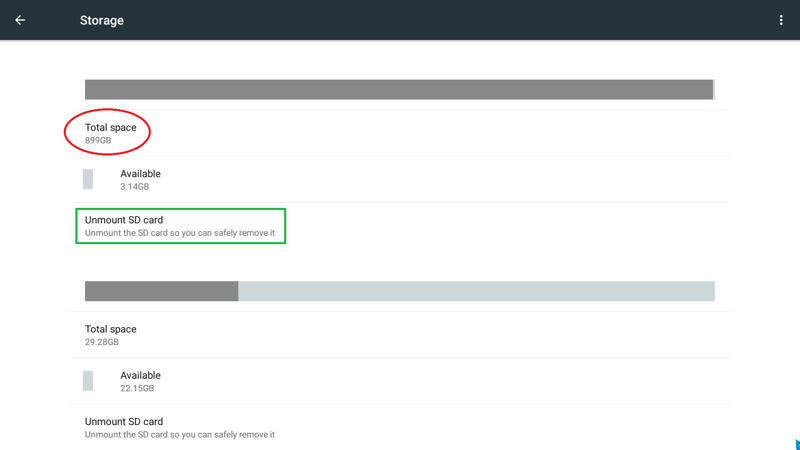
Settings /More / Storage
Identify  you USB HDD (899 GB) use up/down to get it, and press unmount SD Card
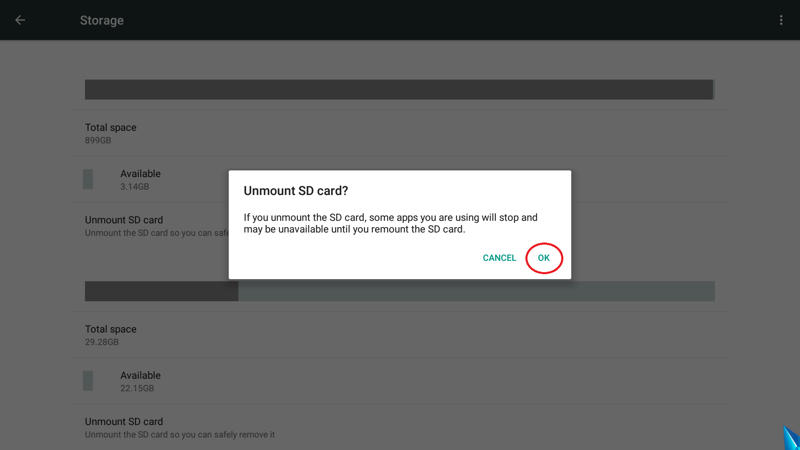
Confirm unmount SD Card (OK).
Look parttion is unmounted (can mount back if need)
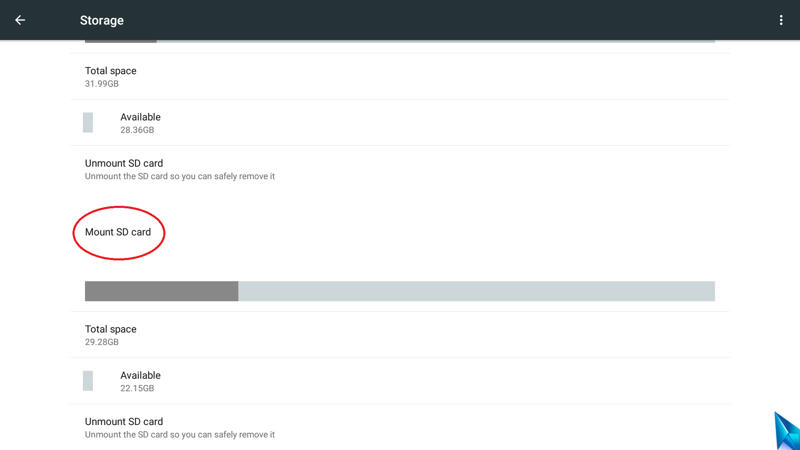

Repeat this step for all partitions, after unmounted all partition is safely to disconnect your USB HDD/Pendrive.

Quickly way like Nice Monkey said,  power off box, disconnect USB HDD and power box back ~35 seconds.


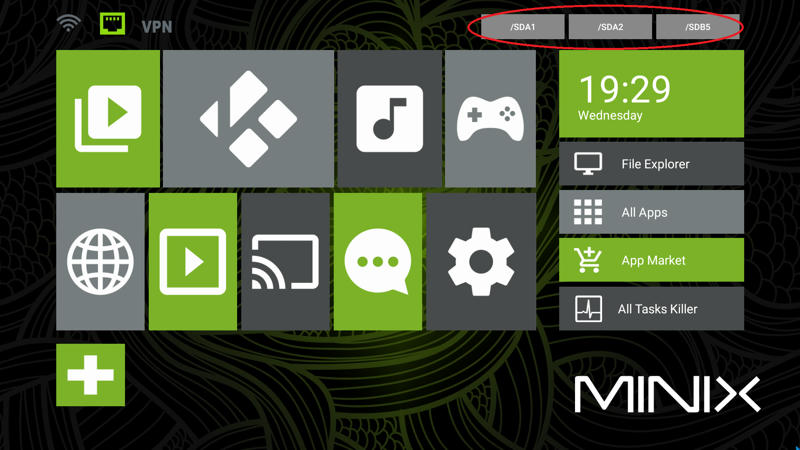
LE:  If anyone want to have unmount partition to home screen can try MINIX METRO
http://www.mediafire.com/download/6d98s1061u3t0zd/MINIX_METRO.apk
 

© SDHDIGITAL LTD 2025
Sitemap
