UK BASED ∙ UK STOCK ∙ ESTABLISHED 2010
2 YEAR WARRANTY ∙ FAST DELIVERY
EXPERT TECHNICAL SUPPORT
09-FEB UGOOS AM6B+ BACK IN STOCK   30-JAN ZIDOO 8K FIRMWARE UPDATE 1.3.05   5-JAN ARYLIC LP10 ADDS QOBUZ CONNECT  
This forum was closed in October 2025 in response to sustained DDOS type attacks. It has been left up read-only to allow access to support information and downloads. Thanks to all the users who contributed over the years.

Visit futeko.com for new Audio and Video Media Players!

Author Topic: [PATCH] Persistent mountpoints for SAMBA / NFS Shares  (Read 186358 times)

ltworf

  • Newbie
  • *
  • Posts: 24
Re: Password Protected Shares Kodi+wrapper
« Reply #60 on: March 07, 2017, 02:56:38 PM »
   # split the row into variables from special chareter |
   # ip_NAS|share_path|username|password|mount_path
   # 192.168.0.2|share/film|admin|1234|FILM

You can't mount in some folder so try:

Code: [Select]
192.168.1.72|d|GLEN|jamieb92|films
192.168.1.72|f/movies|GLEN|jamieb92|films1
192.168.1.72|e/Movies 2|GLEN|jamieb92|films2

>:( >:(
Ok so I'm a dunce! ;D ;D

Now we've got that out of the way I need help!

Trying to configure this darn wrapper thing and getting nowhere. got this in my SMB.txt file id this right?

192.168.1.72|\\SERVER\d\|GLEN|jamieb92|films
192.168.1.72|\\SERVER\f\movies|GLEN|jamieb92|films
192.168.1.72|\\SERVER\e\Movies 2|GLEN|jamieb92|films


Can I ask is there a way to put a say 30 delay in this script as I need to send a WOL to my server to wake it up before mounting the drives?

OR Himedia could just sort it properly! Love the Wrapper idea , just needs tweeking


having trouble with both my Wrapper and auotmaounting my NAS folders
Wiz it looks like you figured both of theses things out. if you can help me please I would be most appreciative. getting very frustrated with this thing.

Sent

  • Newbie
  • *
  • Posts: 49
Re: [PATCH] Persistent mountpoints for SAMBA / NFS Shares
« Reply #61 on: March 07, 2017, 08:21:23 PM »
I have a NFS share. It works without problems in Kodi. But with automount it doesn't work.
I will try the tip to deinstall this on weekend.

ltworf

  • Newbie
  • *
  • Posts: 24
Re: [PATCH] Persistent mountpoints for SAMBA / NFS Shares
« Reply #62 on: March 09, 2017, 12:36:45 AM »
This process creates persistent mountpoints (permanent folder locations retained after reboot) for Samba or NFS shares (including those with passwords). This improves access to these locations in apps including Kodi.

Credit to pcristi / Looun / Eriol

Requires:

- Windows PC to run the batch file at command prompt.
- Q5/Q10 Pro connected to same network as PC and the IP address of Q5/Q10 Pro (Settings - Network).

Instructions:

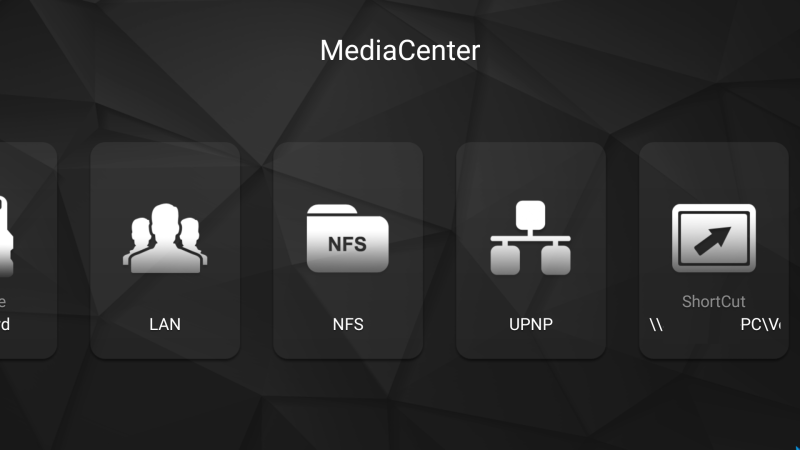
Stage 1. Create shortcuts in HiMedia MediaCentre.

- Open MediaCenter.
- Go to LAN / NFS
- Autosearch for PC/NAS.
- Choose your storage/pc and enter user login and password.
- Choose your share folder
- Save the shortcut.


S
Version History:

1.5
- Improve Android 7 compatibility

when I go to LAN and search it says No server found. yet I can go to Internal sdcard and go to the server folders

Eriol

  • Senior Member
  • ***
  • Posts: 247
Re: [PATCH] Persistent mountpoints for SAMBA / NFS Shares
« Reply #63 on: March 09, 2017, 08:38:58 PM »
I have a NFS share. It works without problems in Kodi. But with automount it doesn't work.
I will try the tip to deinstall this on weekend.

Do you know how to use ADB? You should check the content of the directory with root as well to see if it is a permission problem.

Sent

  • Newbie
  • *
  • Posts: 49
Re: [PATCH] Persistent mountpoints for SAMBA / NFS Shares
« Reply #64 on: March 09, 2017, 10:32:25 PM »
ADB?
Sorry i just can't remember.

The rights for the folder in the NAS i took from the F&Q thread.

Sent

  • Newbie
  • *
  • Posts: 49
Re: [PATCH] Persistent mountpoints for SAMBA / NFS Shares
« Reply #65 on: March 10, 2017, 10:22:26 PM »
« Last Edit: March 10, 2017, 11:03:36 PM by Sent »

Binnugsay

  • Senior Member
  • ***
  • Posts: 214
Re: [PATCH] Persistent mountpoints for SAMBA / NFS Shares
« Reply #66 on: March 11, 2017, 09:38:13 AM »
This process creates persistent mountpoints (permanent folder locations retained after reboot) for Samba or NFS shares (including those with passwords). This improves access to these locations in apps including Kodi.

Credit to pcristi / Looun / Eriol

Requires:

- Windows PC to run the batch file at command prompt.
- Q5/Q10 Pro connected to same network as PC and the IP address of Q5/Q10 Pro (Settings - Network).

Instructions:

Stage 1. Create shortcuts in HiMedia MediaCentre.

- Open MediaCenter.
- Go to LAN / NFS
- Autosearch for PC/NAS.
- Choose your storage/pc and enter user login and password.
- Choose your share folder
- Save the shortcut.


Stage 2. Make your shortcuts persistent.

- Download ShortCut_Mount_v1.5.rar (version 1.5) to Windows PC: http://www.mediafire.com/file/c4koyn5pm413jw4/ShortCut_Mount_v1.5.rar (version 1.5)
- Unzip
- Execeute RUN_ME.bat at Windows command prompt
- Insert Q5/Q10 Pro IP address
- Q5/Q10 Pro will reboot automatically
- After reboot your shortcut shares will be mounted as follows:

Samba: /mnt/sdcard/(server name) _ ( path )
NFS: /mnt/nfsShare/(server name) _ ( path )


Don't remove shortcuts from HiMedia MediaCenter, this will remove the mountpoints.

Version History:

1.5
- Improve Android 7 compatibility

Hello,

Make this procedure to have Persistent mountpoints for SAMBA and d'ont work very well.

Siometimes lose one of them and have the link to folder "appfuse".
So at this time i have to reboot the Himedia to have it again in right way. So can you explain to me what it's done.
At this time, it will very difficult to come back and try to share my folder NAS.
For information i'm using the CS 2.01 Firmware.

The ShortCut_Mount_v1.5 don't work very fine, perhaps i missed something but i'm sure to make as the procedure step by step.

Thanks for your helps

Sent

  • Newbie
  • *
  • Posts: 49
Re: [PATCH] Persistent mountpoints for SAMBA / NFS Shares
« Reply #67 on: March 11, 2017, 02:12:58 PM »

simotani

  • Newbie
  • *
  • Posts: 6
Re: [PATCH] Persistent mountpoints for SAMBA / NFS Shares
« Reply #68 on: May 03, 2017, 08:58:24 AM »
So.. I have no understand..can you tell me the right option for persistant multiponts with last firmware android 7? There is a method ok? Thank you

pcristi

  • Senior Member
  • ***
  • Posts: 1334
Re: [PATCH] Persistent mountpoints for SAMBA / NFS Shares
« Reply #69 on: May 03, 2017, 09:21:42 AM »
No I can't, but give a try
0 - don't install this version of patch for FW with WallPoster app
1 - make all wanted shortcut on MediaCenter --> just for using later if need it
2 - reboot
3 - duplicate a same shortcut on Wallpaper --> to get fix mountpoints
4 - reboot and check persistent mountpoints are create in Samba --> /mnt/smb/,  NFS --> /mnt/nfsShare/
PS: Are conflict between MediaCenter and WallPoster so first need create shortcut on MediaCenter.

So.. I have no understand..can you tell me the right option for persistant multiponts with last firmware android 7? There is a method ok? Thank you
« Last Edit: June 15, 2017, 09:43:35 AM by pcristi »

simotani

  • Newbie
  • *
  • Posts: 6
Re: [PATCH] Persistent mountpoints for SAMBA / NFS Shares
« Reply #70 on: May 03, 2017, 10:33:23 AM »
Ok , thank you for this  :)

bierwiesel

  • Newbie
  • *
  • Posts: 6
Re: [PATCH] Persistent mountpoints for SAMBA / NFS Shares
« Reply #71 on: June 14, 2017, 06:25:03 PM »
I have the MX Player in the kodi as default player. As I understand it, one must mount the nas. It is only over the mount with the script correctly? About kodi, I can not add the nas? When I click on a movie crash the mx player. So I thought it was the mount. If I now take your script, then the shortcut works in the media player perfect and after the reboot is the shortcut broken. In kodi / sdcard .... is the folder empty.

Any idea

I'm sorry for the bad english
« Last Edit: June 14, 2017, 06:26:58 PM by bierwiesel »

Eriol

  • Senior Member
  • ***
  • Posts: 247
Re: [PATCH] Persistent mountpoints for SAMBA / NFS Shares
« Reply #72 on: June 14, 2017, 08:07:15 PM »
I have the MX Player in the kodi as default player. As I understand it, one must mount the nas. It is only over the mount with the script correctly? About kodi, I can not add the nas? When I click on a movie crash the mx player. So I thought it was the mount. If I now take your script, then the shortcut works in the media player perfect and after the reboot is the shortcut broken. In kodi / sdcard .... is the folder empty.

Any idea

I'm sorry for the bad english

From Kodi you cannot play files over the network with external players like MX Player by default. You either need a wrapper or need to play network files mounted to the local filesystem.

If I understand you correctly, the mountpoints script you downloaded from here doesn't do the mounts. And not just the mountpoints are not working but the shortcuts in Media Center getting broken as well?

bierwiesel

  • Newbie
  • *
  • Posts: 6
Re: [PATCH] Persistent mountpoints for SAMBA / NFS Shares
« Reply #73 on: June 15, 2017, 08:25:03 AM »
I dont understand wrapper, i will use The Mount Script.

1. Shortcut in Media Player is working (link to my synology folder)
2. I start The Script (remount succesfully)
3. Restart The Box
4. The Box Display mounting my Mountpoint
5. In kodi -> movies -> files -> browse to sdcard.... Folder with my Servername -> empty
6. The shortcut in Media Player is broken.

The Script says "File already exist" after The msg remount. Is that correct when i repeat Start The Script?

When i delete the shortcut, restart The Box, Then is The mnt Server folder still exist.
« Last Edit: June 15, 2017, 08:26:52 AM by bierwiesel »

pcristi

  • Senior Member
  • ***
  • Posts: 1334
Re: [PATCH] Persistent mountpoints for SAMBA / NFS Shares
« Reply #74 on: June 15, 2017, 09:39:50 AM »
- Mount to /sdcard not working on Android 7 / permission not allow for Kodi, only DLNA server/Samba server can access.
- WallPoster create permanent mount point, so mount point script are in conflict if WallPoster apps use it . (avoided if use repack CFW v2.0.3).
- FW v2.0.3 permission not allow in /mnt/nfsShare or /mnt/smb for Kodi. (will be fixed on next CFW).

Please read msg16084 too
http://www.futeko.com/newforum/index.php?topic=813.msg16084#msg16084
« Last Edit: June 15, 2017, 09:49:08 AM by pcristi »


DELIVERY ∙ PAYMENT ∙ WARRANTY+RETURNS ∙ INTERNATIONAL TAX ∙ ABOUT ∙ PRIVACY ∙ NEWS ∙ CONTACT
© SDHDIGITAL LTD 2026
SITEMAP