UK BASED ∙ UK STOCK ∙ ESTABLISHED 2010
2 YEAR WARRANTY ∙ FAST DELIVERY
EXPERT TECHNICAL SUPPORT
30-JAN ZIDOO 8K FIRMWARE UPDATE 1.3.05   28-JAN WEBSITE INSTABILITY   15-JAN UGOOS AM6B PLUS RESTOCK   5-JAN ARYLIC LP10 ADDS QOBUZ CONNECT  
This forum was closed in October 2025 in response to sustained DDOS type attacks. It has been left up read-only to allow access to support information and downloads. Thanks to all the users who contributed over the years.

Visit futeko.com for new Audio and Video Media Players!

Author Topic: Color space which setting to select?  (Read 78148 times)

DMD

  • Senior Member
  • ***
  • Posts: 310
Color space which setting to select?
« on: June 06, 2018, 07:03:28 AM »
Good morning
the HiMedia Q10 Pro is connected to an LG Oled 65 HDR TV on the HDMI ULTRA Deep Color input.
The setting of the Q10 Pro is set by default on the YCbCr420 8 bit, is this setting correct?

Thank you
« Last Edit: June 22, 2018, 10:54:40 AM by DMD »

codyrocco

  • Newbie
  • *
  • Posts: 24
Re: Color space which setting to select?
« Reply #1 on: June 06, 2018, 07:37:25 AM »
is enough for standard bluray and below.
for uhd you should select  at least 4:2:0 10bit . i'm using 4:2:2 10bit.

DMD

  • Senior Member
  • ***
  • Posts: 310
Re: Color space which setting to select?
« Reply #2 on: June 06, 2018, 08:18:12 AM »
OK.  then set to 4.2.2 @10 bit
Thank you

Mount81

  • Senior Member
  • ***
  • Posts: 1097
Re: Color space which setting to select?
« Reply #3 on: June 06, 2018, 08:38:10 AM »
Are you running your GUI at 30Hz?

On 4K/60Hz and 10bit your best and only choice is to set to 4:2:0. I guess the player will switch automatic to 4:4:4 when switching to 23.976Hz video playback. (You can check it on your AVRs on TVs input info).

nmou88

  • Senior Member
  • ***
  • Posts: 128
Re: Color space which setting to select?
« Reply #4 on: June 06, 2018, 11:27:02 AM »
On 4:2:2 there is no 8 and 10 bits switch
So is it 8 or 10 ?

DMD

  • Senior Member
  • ***
  • Posts: 310
Re: Color space which setting to select?
« Reply #5 on: June 06, 2018, 11:53:31 AM »
Then I leave the default settings YCbCr420 @ 8 bit ?


Thank you
« Last Edit: June 06, 2018, 12:18:20 PM by DMD »

Mount81

  • Senior Member
  • ***
  • Posts: 1097
Re: Color space which setting to select?
« Reply #6 on: June 06, 2018, 04:06:52 PM »
OK, once again: for 4K/HDR/10bit videos on a 4K/HDR/10bit TV:

Set to 420 10bit. Than check your TV/AVR info while you play a video. If it shows 422 10 bit, you'r good (better than any 8 bit), if it shows 444 10 bit you have it even better.

420 8bit makes not much sense in this case.
« Last Edit: June 06, 2018, 04:10:57 PM by Mount81 »

DMD

  • Senior Member
  • ***
  • Posts: 310
Re: Color space which setting to select?
« Reply #7 on: June 06, 2018, 05:04:36 PM »
What I do not understand is the setting value YCbCr422 to how many bits of resolution are.


However I tried to set YCbCr444 10 bit but this is not allowed.
« Last Edit: June 06, 2018, 05:18:07 PM by DMD »

Mount81

  • Senior Member
  • ***
  • Posts: 1097
Re: Color space which setting to select?
« Reply #8 on: June 06, 2018, 06:00:20 PM »
What I do not understand is the setting value YCbCr422 to how many bits of resolution are.


However I tried to set YCbCr444 10 bit but this is not allowed.

Have you checked at least the sheet I've liked (scroll to the middle)? I guess not. You should have find the explanation as I said it before:  On 4K/60Hz and 10 bit: only 420 is allowed, that's a HDMI 2.0a standard regulation.

So setting to 422 will be 8bit for sure. However you can still choose this and than see during video playback if the input on your TV/AVR if it's changing to 10bit or not and to what colorspace if you play a 10bit video. For 10bit video it's best when it's switching to 444/10bit f.e. with 23.976Hz/fps videos. The next closes "best" would be than 422/10bit of course. But I would also recommend leaving it on 420/10bit for 8bit videos, but you must check by your own eyes if you see any change in PQ and aslo that if the "simple" 422 will switch to 10bit or 444 automatic.
« Last Edit: June 06, 2018, 06:11:18 PM by Mount81 »

nmou88

  • Senior Member
  • ***
  • Posts: 128
Re: Color space which setting to select?
« Reply #9 on: June 07, 2018, 11:06:27 AM »
Does 4:2:2 switch automatically to 10 ? Is it 8 by default ?

DMD

  • Senior Member
  • ***
  • Posts: 310
Re: Color space which setting to select?
« Reply #10 on: June 07, 2018, 05:44:41 PM »
I tried with other HD TV not HDR (only 1080p) to check the color space setting.
and the HiMedia, and it was set by default YCbCr422.
So I tried to select YCbCr420 8 bits and YCbCr420 10 bits and gave me the following message.
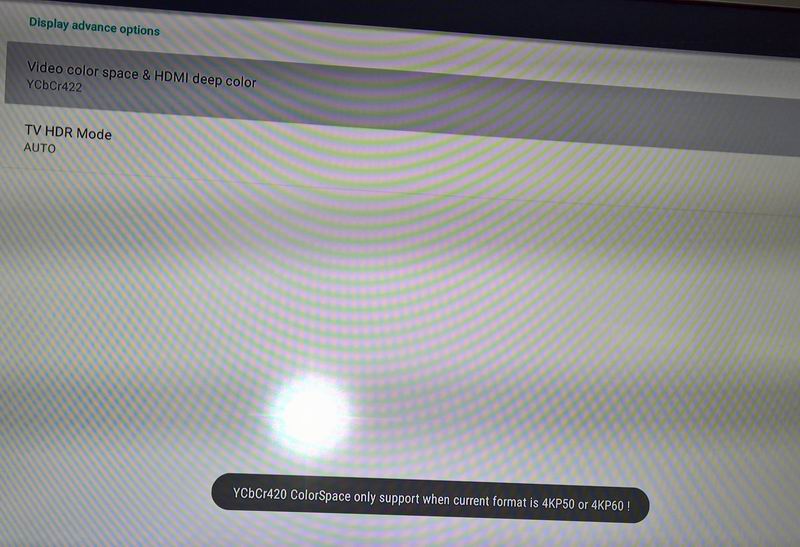


Does this mean that the YCbCr420 8 bits and YCbCr420 10 bits color spaces are only reserved for 4KP50 and 4KP60 systems, so YCbCr422 is a color space only for Hd and not UHD.

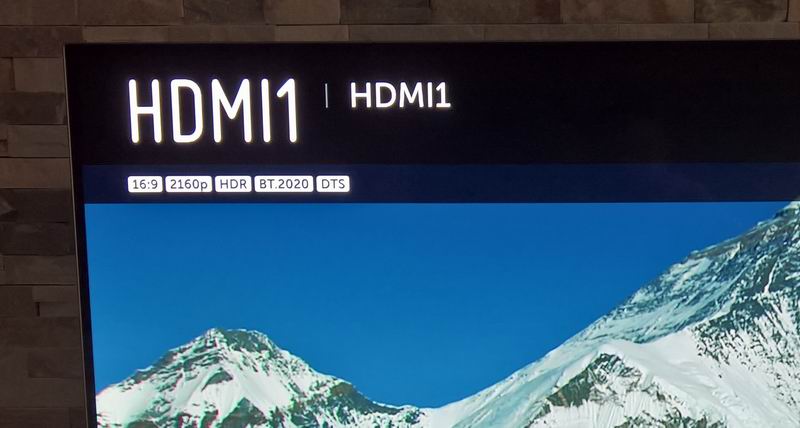
However, I think that the color space adapts automatically according to the output signal and the connected display.


The problem is that I can not verify it while playing a movie, with the info button on the LG TV I get only this information
« Last Edit: June 07, 2018, 07:05:21 PM by DMD »

pcristi

  • Senior Member
  • ***
  • Posts: 1334
Re: Color space which setting to select?
« Reply #11 on: June 07, 2018, 10:45:35 PM »
@DMD
Run via adb shell or add on Q5Q10PRO-OUPUTINFO tool
Code: [Select]
adb shell "grep Color /proc/msp/hdmi0"
DeepColorMode will give wanted information

24 = 8Bit
30 = 10Bit
36 = 12Bit


DMD

  • Senior Member
  • ***
  • Posts: 310
Re: Color space which setting to select?
« Reply #12 on: June 08, 2018, 07:45:37 AM »
73/5000
Thanks for the information.
I performed the test and these are the results:


pcristi

  • Senior Member
  • ***
  • Posts: 1334
Re: Color space which setting to select?
« Reply #13 on: June 08, 2018, 08:03:49 AM »
Is look like you forgot to add code line on Q5Q10PRO-OUPUTINFO.bat file.
Code: [Select]
adb shell "grep Color /proc/msp/hdmi0"Please added somewhere after line 21/22.

grep command will add info like that
Code: [Select]
DeepColorMode  : 30                    SpdInfoEnable  : NO
OutColorSpace  : YCbCr444              MpegInfoEnable : NO
ColorSpaceAdapt: NO                    DeepColorAdapt : NO

DMD

  • Senior Member
  • ***
  • Posts: 310
Re: Color space which setting to select?
« Reply #14 on: June 08, 2018, 08:11:29 AM »
I added the line in the .bat file


DELIVERY ∙ PAYMENT ∙ WARRANTY+RETURNS ∙ INTERNATIONAL TAX ∙ ABOUT ∙ PRIVACY ∙ NEWS ∙ CONTACT
© SDHDIGITAL LTD 2026
SITEMAP


