UK BASED ∙ UK STOCK ∙ ESTABLISHED 2010
2 YEAR WARRANTY ∙ FAST DELIVERY
EXPERT TECHNICAL SUPPORT
30-JAN ZIDOO 8K FIRMWARE UPDATE 1.3.05   28-JAN WEBSITE INSTABILITY   15-JAN UGOOS AM6B PLUS RESTOCK   5-JAN ARYLIC LP10 ADDS QOBUZ CONNECT  
This forum was closed in October 2025 in response to sustained DDOS type attacks. It has been left up read-only to allow access to support information and downloads. Thanks to all the users who contributed over the years.

Visit futeko.com for new Audio and Video Media Players!

Author Topic: Jump to specific time?  (Read 14358 times)

Iris2016

  • Newbie
  • *
  • Posts: 6
Jump to specific time?
« on: September 15, 2016, 10:47:20 AM »
Hi all,

Just a new user of the Himedia q10. So far, so good. Just a few questions...

To start, how I can I go to a specific time within a movie  using   the controller ?

Thanks!

futeko.com

  • Administrator
  • Senior Member
  • *****
  • Posts: 4657
Re: Jump to specific time?
« Reply #1 on: September 16, 2016, 08:42:28 AM »
Using HiMedia internal player (so also Kodi+wrapper) you can't jump direct to time.

The fastest way to jump to a time is to use the d-pad left/right buttons on the remote. The time marker will accelerate as you hold the buttons, it's very quick to skip through video this way.

Djinn

  • Newbie
  • *
  • Posts: 41
Re: Jump to specific time?
« Reply #2 on: September 16, 2016, 10:15:07 AM »
Futeko admin:

I'm sad to hear this. Even my 8-years old TVIX 6500 multimedia player can go to a specific time in almost any video or audio file. Could you send a feature request to add time seek to HiMedia internal player?

Thank you very much
« Last Edit: September 16, 2016, 03:25:20 PM by Djinn »

pcristi

  • Senior Member
  • ***
  • Posts: 1334
Re: Jump to specific time?
« Reply #3 on: September 16, 2016, 03:46:26 PM »
This is Android device, press mouse button and go where you need.
None once of Android player have old still to go a specific time like dedicate mediaplayer.

Futeko admin:

I'm sad to hear this. Even my 8-years old TVIX 6500 multimedia player can go to a specific time in almost any video or audio file. Could you send a feature request to add time seek to HiMedia internal player?

Thank you very much

Djinn

  • Newbie
  • *
  • Posts: 41
Re: Jump to specific time?
« Reply #4 on: September 16, 2016, 06:15:09 PM »
This is Android device, press mouse button and go where you need.
None once of Android player have old still to go a specific time like dedicate mediaplayer.
But this Android device was designed to be a multimedia player (mainly), right? I think it wouldn't be too hard to implement a time seek feature when it has already been implemented USB HDD support and even optical drive support (it seems). None of those features are present on "normal" Android devices.
Even on a good video player app for phone/tablet you can go to a specific time. I don't understand why my very old multimedia player can do that and a 2016 device with a high performance SoC not.

Futeko, can you confirm if this is possible? Thanks
« Last Edit: September 16, 2016, 06:25:03 PM by Djinn »

pcristi

  • Senior Member
  • ***
  • Posts: 1334
Re: Jump to specific time?
« Reply #5 on: September 17, 2016, 12:14:51 AM »
Help my memory.
What is Android video player aps witch can go to specific time like old media player?
Example to input 01:05:35 and jump to this time, to have some inspiration for HiMedia Team.

Old mediaplayer press time seek show similar to this one.
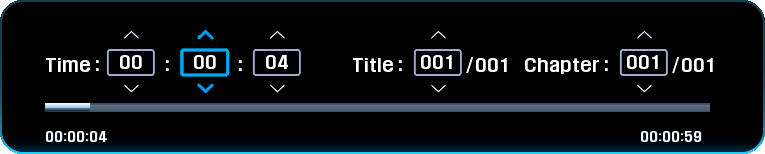

To make jump time on HiMediaVideoPlayer using just IR remote
- press pause button  / mouse button / use direction buttons go to need point of seek bar and press OK button.
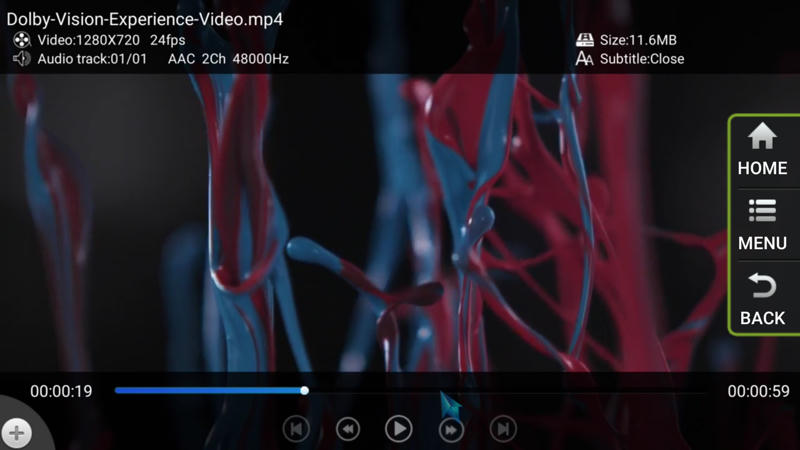

Anyway is match faster/convenient to use seek option by press and keep left/right direction buttons to reach specific time.
HiMedia Team have spend time for fix remaining bug and to improve just added feature like download multilanguage subtitle.

But this Android device was designed to be a multimedia player (mainly), right? I think it wouldn't be too hard to implement a time seek feature when it has already been implemented USB HDD support and even optical drive support (it seems). None of those features are present on "normal" Android devices.
Even on a good video player app for phone/tablet you can go to a specific time. I don't understand why my very old multimedia player can do that and a 2016 device with a high performance SoC not.
« Last Edit: September 17, 2016, 12:39:07 AM by pcristi »

Djinn

  • Newbie
  • *
  • Posts: 41
Re: Jump to specific time?
« Reply #6 on: September 17, 2016, 12:59:37 AM »
Yes, I know what you are saying, but as an old TVIX user, I would also prefer direct input of time (your first example) on internal player and not only the seek bar, as the OP requested. After all, the remote has number buttons.
« Last Edit: September 17, 2016, 01:12:49 AM by Djinn »

futeko.com

  • Administrator
  • Senior Member
  • *****
  • Posts: 4657
Re: Jump to specific time?
« Reply #7 on: September 19, 2016, 08:43:33 AM »
I will pass this as a feature request to Himedia but it will be low priority. Jumping to a time was a seek method for older media players because they were so slow at seeking. Seeking using a very responsive slider (as with Himedia Pro) is faster in most circumstances.

rdksrk2016

  • Newbie
  • *
  • Posts: 20
Re: Jump to specific time?
« Reply #8 on: September 19, 2016, 09:31:30 AM »
Would like to add another wish similar to the time selection.

Would like to have facility to bookmark times of particular scenes in a particular movie manually and store for that movie. Sometimes we feel like watching some good scenes repeatedly instead of searching the whole movie to track those scenes.

It might be difficult but might be a differentiating feature as compared to other players in the market.

nick81

  • Full Member
  • **
  • Posts: 57
Re: Jump to specific time?
« Reply #9 on: September 19, 2016, 12:56:45 PM »
Would like to add another wish similar to the time selection.

Would like to have facility to bookmark times of particular scenes in a particular movie manually and store for that movie. Sometimes we feel like watching some good scenes repeatedly instead of searching the whole movie to track those scenes.

It might be difficult but might be a differentiating feature as compared to other players in the market.

This could be doable I guess, by storing the times in a txt or csv files in the same folder as the movie. Considering I have zero experience developing for Android, not sure if this is possible here...

Phil181

  • Senior Member
  • ***
  • Posts: 388
Re: Jump to specific time?
« Reply #10 on: September 19, 2016, 01:18:39 PM »
Would like to add another wish similar to the time selection.

Would like to have facility to bookmark times of particular scenes in a particular movie manually and store for that movie. Sometimes we feel like watching some good scenes repeatedly instead of searching the whole movie to track those scenes.

It might be difficult but might be a differentiating feature as compared to other players in the market.

This is what "Chapters" in Blu-rays do.  They can also be included in mkv rips.  If the movies you have don't have chapters, you can mux them in using MKVToolNix GUI with a .csv file as mentioned.
These can commonly be found and downloaded from:   http://chapterdb.org/browse
Or you make up your own and mux it in.  To rip chapters from a Blu-ray, you can use "ChapterGrabber" from the same website (and save as a .csv).

The Q10 Pro will skip to next chapter in an .mkv video using the remote. 
Also great for music concerts to skip over songs.

Leviathan99

  • Newbie
  • *
  • Posts: 24
Re: Jump to specific time?
« Reply #11 on: September 19, 2016, 02:01:06 PM »
I will pass this as a feature request to Himedia but it will be low priority. Jumping to a time was a seek method for older media players because they were so slow at seeking. Seeking using a very responsive slider (as with Himedia Pro) is faster in most circumstances.

Coming from a TVIX player I can see both sides of the 'specific-time' and 'seek' argument. 

One feature I really liked from the old TVIX player was the ability to look at the last few media files that were played (history) and the time index where the video was stopped.  For example instead of searching through my movie/tv folders to find the file again I could simply bring up the history (recent files played) tab and restart the movie from there.  I used this feature a lot and it seems like it would be fairly easy to implement.

It would be nice to add this to the list after the few remaining bugs are fixed.

Djinn

  • Newbie
  • *
  • Posts: 41
Re: Jump to specific time?
« Reply #12 on: September 19, 2016, 03:36:46 PM »
Leviathan99: I totally agree. I come from a TVIX too and that's why I proposed that. If you've seen 01:05:00 from a movie, you want to jump to that time exactly, without seeking that moment manually. Also bookmarks (you called it 'history') was a very nice feature from TVIX that I'd like to see on this device.

rdksrk2016

  • Newbie
  • *
  • Posts: 20
Re: Jump to specific time?
« Reply #13 on: September 19, 2016, 03:39:16 PM »
Would like to add another wish similar to the time selection.

Would like to have facility to bookmark times of particular scenes in a particular movie manually and store for that movie. Sometimes we feel like watching some good scenes repeatedly instead of searching the whole movie to track those scenes.

It might be difficult but might be a differentiating feature as compared to other players in the market.

This is what "Chapters" in Blu-rays do.  They can also be included in mkv rips.  If the movies you have don't have chapters, you can mux them in using MKVToolNix GUI with a .csv file as mentioned.
These can commonly be found and downloaded from:   http://chapterdb.org/browse
Or you make up your own and mux it in.  To rip chapters from a Blu-ray, you can use "ChapterGrabber" from the same website (and save as a .csv).

The Q10 Pro will skip to next chapter in an .mkv video using the remote. 
Also great for music concerts to skip over songs.

Thanks. But this is for making chapters from Blu ray or DVD disc's. How to make chapters from already existing MKV or MP4 video files instead of extracting from disc's ?

Phil181

  • Senior Member
  • ***
  • Posts: 388
Re: Jump to specific time?
« Reply #14 on: September 22, 2016, 02:10:49 PM »


Thanks. But this is for making chapters from Blu ray or DVD disc's. How to make chapters from already existing MKV or MP4 video files instead of extracting from disc's ?
Create your own csv file to your own specific needs and mux it into the video.


DELIVERY ∙ PAYMENT ∙ WARRANTY+RETURNS ∙ INTERNATIONAL TAX ∙ ABOUT ∙ PRIVACY ∙ NEWS ∙ CONTACT
© SDHDIGITAL LTD 2026
SITEMAP