UK BASED ∙ UK STOCK ∙ ESTABLISHED 2010
2 YEAR WARRANTY ∙ FAST DELIVERY
EXPERT TECHNICAL SUPPORT
4-JUN INTRUDUCING R_VOLUTION   3-JUN ZIDOO Z9X 8K AND Z30 PRO PRICE RISE   2-JUN INTRODUCING XIAOMI TV BOX S GEN 3 WITH COREELEC
Zidoo UHD8000
8K Media Player with 2x 3.5" HDD bays , ESS audio DAC and dual HDMI.
  INCLUDES EXPRESS 2-4 DAY DELIVERY 
This forum was closed in October 2025 in response to sustained DDOS type attacks. It has been left up read-only to allow access to support information and downloads. Thanks to all the users who contributed over the years.

Visit futeko.com for new Audio and Video Media Players!

Author Topic: poor quality / sharpness video files  (Read 5410 times)

simo241

  • Newbie
  • *
  • Posts: 11
poor quality / sharpness video files
« on: October 03, 2016, 12:18:14 AM »
Hello I recently purchased Q10, the first time I noticed the poor quality video compared to how I was used.

Video files in high definition (.mkv) tends to be a little sharper and lose quality in the action scenes or low light.
They compare what I see the quality of poor DVD.

I connected the Q10 with the supplied HDMI cable in the box, connected to a full hd tv sony 46 ".

the same video file put it in my external hard drive and look at him through a table bluray player I see it perfectly how to be a high-definition file, while the same video files watched with Q10 I see Unclear and poor quality.

I tried to change the display settings and change resolutions without results, I do not know what else to try ..
pray for your help, thank you very much

futeko.com

  • Administrator
  • Senior Member
  • *****
  • Posts: 4657
Re: poor quality / sharpness video files
« Reply #1 on: October 03, 2016, 09:17:39 AM »
What resolution are you talking about when you say high definition? 1080p or 4K? What app are you using for playback? Kodi / HiMedia Media Center / Kodi+wrapper?

First 10 Pro system resolution could be wrong. For a full-HD TV Home - Settings - Display should almost certainly be set to 1080p 60Hz.

If you're playing using Media Center or Kodi+wrapper press menu on remote during playback. Now navigate to Advanced Options - PQ Settings. You could try experimenting with these settings to get best picture but personally I would have everything off with minimum processing. So:

Display Mode - Standard.
Imprex Engine - Off (default is On)

The Imprex options are the most important for picture quality. To turn them off as completely as possible:
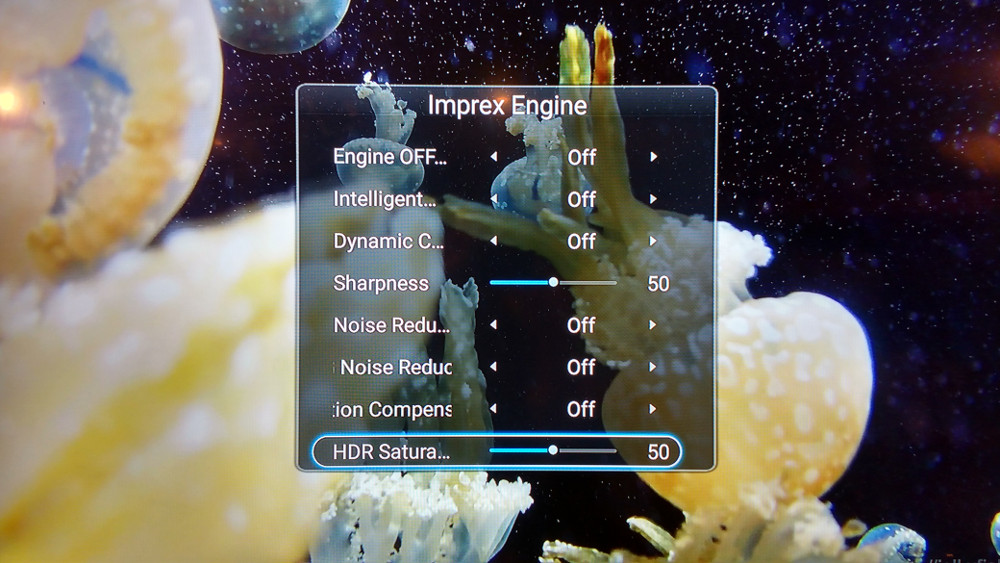


Finally, you could try switching colour space mode. Go Home - Settings - More - Advanced options - Video color space & HDMI deep color. Switch between the RGB444 8bit, YCbCr444 8bit  and YCbCR422 options to see which looks best.

simo241

  • Newbie
  • *
  • Posts: 11
Re: poor quality / sharpness video files
« Reply #2 on: October 04, 2016, 09:10:38 AM »
Thanks a lot for the answer.
I have improved the vision thanks to the first tip:
             Display Mode - Standard.
             Imprex Engine - Off (default is On)
to further improve the sharpness especially in fast moving scenes or action which you advise me to try setting?

With the second piece of advice I did not get any improvement.

I mean with high definition at 1080p and I have tried both the media center and kodi but the result was the same.
I upgraded the system to version 1.0.7 HMD


Now I have a new problem, we await your reply I tried to do a factory reset, but now I can not see the video by kodi (wrapper), opening the file does not work, does not start the movie.
What may have happened?
I tried another factory reset but the problem is still there, I can not see the video through kodi.

Thanks so much

futeko.com

  • Administrator
  • Senior Member
  • *****
  • Posts: 4657
Re: poor quality / sharpness video files
« Reply #3 on: October 04, 2016, 09:30:19 AM »
Personally I would have Imprex off, but for fast moving scenes you could try turning just motion compensation on.

A factory reset is never a good idea with HiMedia Q5/Q10 Pro. You lose some systems apps installed after the firmware update. My advice would be to do a full firmware reinstall as here: http://www.futeko.com/newforum/index.php?topic=1130.0

Alternatively if you go to My Apps you should have an app named 'Wrapper'. Run this and select 'Set to wrapper player' to reinstall wrapper to Kodi. If you don't have the wrapper app then it can itself be reinstalled: http://www.futeko.com/newforum/index.php?topic=710.0

simo241

  • Newbie
  • *
  • Posts: 11
Re: poor quality / sharpness video files
« Reply #4 on: October 07, 2016, 09:43:16 AM »
Thank you so much Futeko, I've resolved all my problem.
Very thank!
Now I just have to make me a culture of kodi to understand how it works. ;D


DELIVERY ∙ PAYMENT ∙ WARRANTY+RETURNS ∙ INTERNATIONAL TAX ∙ ABOUT ∙ PRIVACY ∙ NEWS ∙ CONTACT
© SDHDIGITAL LTD 2026
SITEMAP

