UK BASED ∙ UK STOCK ∙ ESTABLISHED 2010
2 YEAR WARRANTY ∙ FAST DELIVERY
EXPERT TECHNICAL SUPPORT
4-JUN INTRUDUCING R_VOLUTION   3-JUN ZIDOO Z9X 8K AND Z30 PRO PRICE RISE   2-JUN INTRODUCING XIAOMI TV BOX S GEN 3 WITH COREELEC
Zidoo Z3000 Pro
8K Media Player with 3.5" HDD bay and dual HDMI.
  INCLUDES EXPRESS 2-4 DAY DELIVERY 
This forum was closed in October 2025 in response to sustained DDOS type attacks. It has been left up read-only to allow access to support information and downloads. Thanks to all the users who contributed over the years.

Visit futeko.com for new Audio and Video Media Players!

Author Topic: Q10 Pro Bootup fail after flashing firmware.  (Read 11557 times)

k-mad

  • Newbie
  • *
  • Posts: 35
Q10 Pro Bootup fail after flashing firmware.
« on: June 10, 2018, 07:10:54 AM »
Hi,

I recently did a hard reset on the box after lots of glitches like playstore no longer working, kodi crashes etc..which worked fine getting it back to base which was this firmwear -> ANDROID 7. 2.0.0-FUTEKO-EN. HMD-2.0.0 2016-11-17.181855.zip

Then it failed when I tried to flash  -> update_Q10Pro_(update&themed&Kodi17.6)v2.1-HMD-2.0.8 2018-04-03.195232

I can't seem to get it to load at all past the himedia screen anymore which it just hangs on for over 30mins.
If I try a hard reset now it just gives me the ring for about 10 seconds then hangs on the Himedia logo.

When I try to flash back to any other old firmware I get an android bear graphic, laying on it's back with a red exclamation mark with a loading bar underneath that ticks along for 6 seconds and then it glitches to the Himedia logo and hangs again.
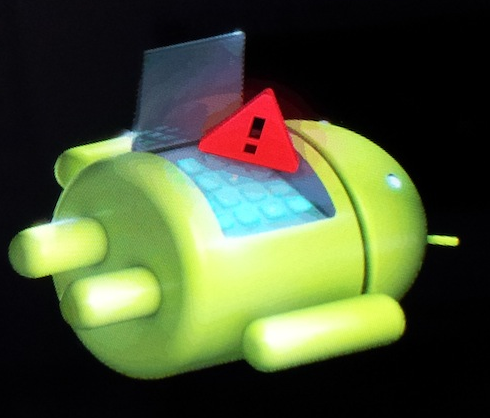

Any suggestions?
I'm at a loss.

Thanks
« Last Edit: June 11, 2018, 12:26:04 AM by k-mad »

futeko.com

  • Administrator
  • Senior Member
  • *****
  • Posts: 4657
Re: Q10 Pro Bootup fail after flashing firmware.
« Reply #1 on: June 11, 2018, 12:03:40 PM »
You can't update from 2.0.0 direct to 2.0.8. We give details of the correct update process in the instructions of every firmware thread.

From 2.0.0 the correct order is 2.0.0 > 2.0.3 > 2.0.4 > 2.0.8.

Why was it running 2.0.0 in the first place?

My advice now is to try and install 2.0.0 or 2.0.1 then update as above. If that doesn't work try installing 2.0.1 with the files in this post (http://www.futeko.com/newforum/index.php?topic=1622.msg14469#msg14469) added to the USB stick. If that doesn't work install 2.0.1 according to the full instructions in that post.

k-mad

  • Newbie
  • *
  • Posts: 35
Re: Q10 Pro Bootup fail after flashing firmware.
« Reply #2 on: June 11, 2018, 02:36:44 PM »
Thanks,

I'll try running through your suggestions.

It was running 2.0.0 because that was what came loaded on it in the first place.  I tried numerous other versions but there were so many bugs I always went back to base.

futeko.com

  • Administrator
  • Senior Member
  • *****
  • Posts: 4657
Re: Q10 Pro Bootup fail after flashing firmware.
« Reply #3 on: June 11, 2018, 02:54:01 PM »
2.0.0 was the first Android 7 firmware. I don't recommend using it. If you want to use a firmware form that era then 2.0.1 is much more stable.

k-mad

  • Newbie
  • *
  • Posts: 35
Re: Q10 Pro Bootup fail after flashing firmware.
« Reply #4 on: June 11, 2018, 03:03:52 PM »
Thanks again,

I've just tried this
Quote
My advice now is to try and install 2.0.0 or 2.0.1 then update as above. If that doesn't work try installing 2.0.1 with the files in this post (http://www.futeko.com/newforum/index.php?topic=1622.msg14469#msg14469) added to the USB stick.
and there is no change, it doesn't seem to recognise the additional boot/recovery files (bootargs.bin, fastboot.bin, recovery.img) which were extracted into the root directory of the usb along with the firmware 'update.zip'
It just does the same exclamation android logo and glitch loop.

So my only option now is to pull it apart and try to short the two pins?

Phil181

  • Senior Member
  • ***
  • Posts: 388
Re: Q10 Pro Bootup fail after flashing firmware.
« Reply #5 on: June 11, 2018, 03:42:39 PM »
as per all the firmware instructions, you should only have the single file"update.zip" on a FAT32 formatted USB drive for it to be recognised. 
Don't extract the file and it may work for you.

k-mad

  • Newbie
  • *
  • Posts: 35
Re: Q10 Pro Bootup fail after flashing firmware.
« Reply #6 on: June 11, 2018, 11:39:21 PM »
Thanks Phil,

I tried it like that originally..just the update .zip

When that failed I followed Futeko's advice and included the additional boot files from the post they linked to.


So I'm at a loss how to boot this thing back up?

k-mad

  • Newbie
  • *
  • Posts: 35
Re: Q10 Pro Bootup fail after flashing firmware.
« Reply #7 on: June 18, 2018, 09:06:10 AM »
Okay, so I pulled it all apart tonight and the only firmware that seemed to do anything was Android 7 vers 2.01

I got it to load the android robot which ran with a little infinity animation on it's check without a red exclamation and at least it was an upright robot but there was no code, or progress bar. After about a minute it just rebooted back to the himedia screen and hung there for over 20mins.

Second time I tried it with the same firmware it went from himedia logo to a plain black screen and nothing has happened for 10 mins.

I also tried android 5 migration firmware just in case it was somehow reverted to that but it didn't change anything either.

I have no idea what to do now. It's feeling like a doorstop and it's out of warranty.

Suggestions?
« Last Edit: June 18, 2018, 12:04:01 PM by k-mad »

futeko.com

  • Administrator
  • Senior Member
  • *****
  • Posts: 4657
Re: Q10 Pro Bootup fail after flashing firmware.
« Reply #8 on: June 18, 2018, 02:08:58 PM »
Try the pin shorting method with USB stick + the files linked to in my earlier post + firmware 2.0.0 update.zip (as it was what was running before these problems).

k-mad

  • Newbie
  • *
  • Posts: 35
Re: Q10 Pro Bootup fail after flashing firmware.
« Reply #9 on: June 18, 2018, 11:26:02 PM »
Thanks,

Yes, I tried that first.

I pulled it apart to do the pin shorting reboot with the boot files and update 2.0.0

I'll do it again and film it for you.


k-mad

  • Newbie
  • *
  • Posts: 35
Re: Q10 Pro Bootup fail after flashing firmware.
« Reply #10 on: June 24, 2018, 01:18:45 AM »
Hi again,

Here is video of what's happening when I try to flash it with the box pulled apart and shorting the two pins with a screwdriver.
[youtube]https://youtu.be/DuOaFuATTQg[/youtube]

futeko.com

  • Administrator
  • Senior Member
  • *****
  • Posts: 4657
Re: Q10 Pro Bootup fail after flashing firmware.
« Reply #11 on: June 25, 2018, 09:06:22 AM »
You're getting the Android 5.1 update screen, which indicates that the box has an Android 5.1 firmware installed.

Try flashing as per the forum link but with update.zip from Android 5.1 firmware 1.0.7).

So bootargs.bin, fastboot.bin, recovery.img from here: http://www.futeko.com/newforum/index.php?topic=1622.msg14469#msg14469

Plus udate.zip from here: http://www.futeko.com/newforum/index.php?topic=1130.0

k-mad

  • Newbie
  • *
  • Posts: 35
Re: Q10 Pro Bootup fail after flashing firmware.
« Reply #12 on: June 26, 2018, 09:12:42 AM »
Thanks,

Just tried that and it's the exact same problem.

I'll try it with other versions of 5.1 and see if something works.

k-mad

  • Newbie
  • *
  • Posts: 35
Re: Q10 Pro Bootup fail after flashing firmware.
« Reply #13 on: June 26, 2018, 12:49:12 PM »
I've now tried it with the boot recovery files plus the following firmwares..

1.1.0
1.0.9
1.0.8
1.0.7
1.0.6
1.0.3

^all of those gave an error.

and then I tried this because I think I installed it at some point ->  update_Q10Pro_(update&themed&Kodi17shitty)_HMD-1.1.0 2017-03-15.164418 seems to have made it all the way through the android recovery update (took 20mins) then rebooted but now looks hung on the Himedia screen again.

« Last Edit: June 26, 2018, 01:02:23 PM by k-mad »

k-mad

  • Newbie
  • *
  • Posts: 35
Re: Q10 Pro Bootup fail after flashing firmware.
« Reply #14 on: June 27, 2018, 02:25:31 AM »
Yep, this ->  update_Q10Pro_(update&themed&Kodi17shitty)_HMD-1.1.0 2017-03-15.164418 is the only firmwear that has run all the way through and then rebooted but it just hangs on the himedia logo (at least the logo animates now with the lens flare effect)


I am at a loss.


DELIVERY ∙ PAYMENT ∙ WARRANTY+RETURNS ∙ INTERNATIONAL TAX ∙ ABOUT ∙ PRIVACY ∙ NEWS ∙ CONTACT
© SDHDIGITAL LTD 2026
SITEMAP

