UK BASED ∙ UK STOCK ∙ ESTABLISHED 2010
2 YEAR WARRANTY ∙ FAST DELIVERY
EXPERT TECHNICAL SUPPORT
09-FEB UGOOS AM6B+ BACK IN STOCK   30-JAN ZIDOO 8K FIRMWARE UPDATE 1.3.05   5-JAN ARYLIC LP10 ADDS QOBUZ CONNECT  
This forum was closed in October 2025 in response to sustained DDOS type attacks. It has been left up read-only to allow access to support information and downloads. Thanks to all the users who contributed over the years.

Visit futeko.com for new Audio and Video Media Players!

Author Topic: Himedia doesn't display 4K resolution (images not video)  (Read 9964 times)

honto

  • Newbie
  • *
  • Posts: 22
Himedia doesn't display 4K resolution (images not video)
« on: April 03, 2018, 03:55:45 PM »
Recently, I've found out that Himedia doesn't really display 4K resolution (3840 x 2160). I tested it with this image.

First, I tested with my 4K TV's native player, and this is what it displays (It's displayed normally) :
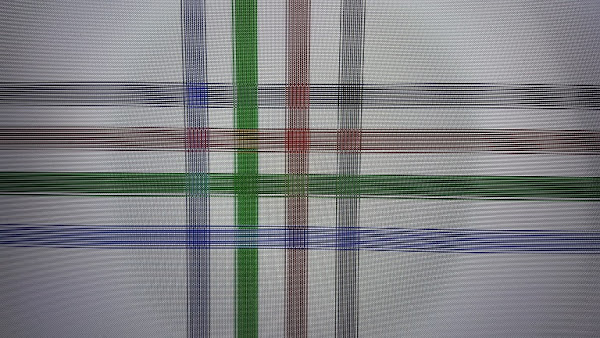

Then I tested it with Himedia:


See the difference?
I'm not sure if Himedia upscale or downscale it, but the image is not displayed as it should be.

Using Himedia's Kodi is even worse:
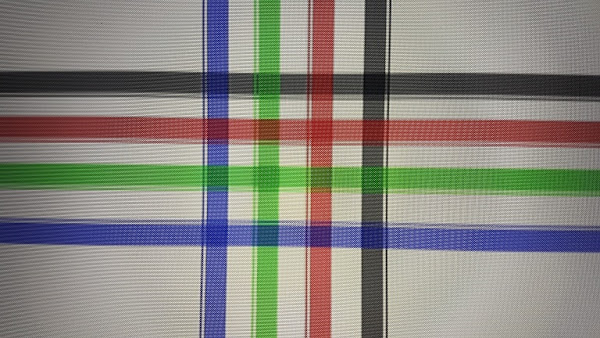
The scaling is way too much. :(

I don't know :-\, now I've started using my 4K TV's native player to watch videos, although the navigation is less better than Himedia.

(And yes, I've set the Himedia's resolution to 2160p 60hz  ;  YCbCr420 10Bit)

I think most of 4K android boxes are only capable on streaming 4K contents, not displaying
« Last Edit: April 04, 2018, 09:25:43 AM by futeko.com »

futeko.com

  • Administrator
  • Senior Member
  • *****
  • Posts: 4657
Re: Himedia doesn't display 4K resolution
« Reply #1 on: April 03, 2018, 04:30:58 PM »
There is something wrong with how your TV is set up.

Possibly you have set scale to fit or similar, or possibly there is a setting to enable 4K60 and HDR on the specific HDMI input.

Himedia Q5/Q10 Pro 100% certain display 4K correctly.

honto

  • Newbie
  • *
  • Posts: 22
Re: Himedia doesn't display 4K resolution
« Reply #2 on: April 03, 2018, 05:06:59 PM »
There is something wrong with how your TV is set up.

Possibly you have set scale to fit or similar, or possibly there is a setting to enable 4K60 and HDR on the specific HDMI input.

Himedia Q5/Q10 Pro 100% certain display 4K correctly.
There's no scale configuration or similar on my TV.
The only setting on the HDMI is "HDMI ULTRA HD Deep Colour". And it's set "ON"

Everyone should try it to see if I'm wrong, anyway.

pcristi

  • Senior Member
  • ***
  • Posts: 1334
Re: Himedia doesn't display 4K resolution
« Reply #3 on: April 03, 2018, 07:47:24 PM »
Check on TV picture menu option and search for Picture Size where try change from 16:9 to screen fit, usually  Picture size can be defined to each input source separably.

honto

  • Newbie
  • *
  • Posts: 22
Re: Himedia doesn't display 4K resolution
« Reply #4 on: April 03, 2018, 08:17:16 PM »
Check on TV picture menu option and search for Picture Size where try change from 16:9 to screen fit, usually  Picture size can be defined to each input source separably.
I've tried it, the result is still the same

I've even tried this to my friend's 4K TV

honto

  • Newbie
  • *
  • Posts: 22
Re: Himedia doesn't display 4K resolution
« Reply #5 on: April 03, 2018, 09:38:50 PM »
How about all of those so-called 'picture processing' options which are on by default and usually makes matters worse?? Turn those off.

You know marketing BS.  ::)
I tried to switch any option that can be switched ON and OFF, and still no luck

Okay, simple question
Does anyone here have 4K TV so he/she can prove if I'm right or wrong?

futeko.com

  • Administrator
  • Senior Member
  • *****
  • Posts: 4657
Re: Himedia doesn't display 4K resolution
« Reply #6 on: April 04, 2018, 09:25:08 AM »
Should be noted that the test file is a 4K image, not video.

Video displays at full 4K resolution, images are limited to the OS resolution, which is 1080p.

Mount81

  • Senior Member
  • ***
  • Posts: 1097
Re: Himedia doesn't display 4K resolution (images not video)
« Reply #7 on: April 04, 2018, 10:37:03 AM »
So the 4K pictures are downscaled to 1080p and than back to 4K by the device even if the system res set to 4K? So there's no chance for native 4K picture  display? LOL, I've never have thought that this could exist... Another "bug" to deal with...

futeko.com

  • Administrator
  • Senior Member
  • *****
  • Posts: 4657
Re: Himedia doesn't display 4K resolution (images not video)
« Reply #8 on: April 04, 2018, 10:45:54 AM »
It's actually very normal for Android devices.

Q5/Q10 Pro are designed mainly for playing video, not displaying pixel perfect 4K jpgs.

honto

  • Newbie
  • *
  • Posts: 22
Re: Himedia doesn't display 4K resolution (images not video)
« Reply #9 on: April 04, 2018, 07:39:38 PM »
I believe the result will be the same if only someone can make that 4K test image to be a video file without any compression.

Here a 4k video test I found >>  Download (2,4 mb)
But  the difference is not as obvious as the image test.

Look at the smallest text below as a comparison...

Mount81

  • Senior Member
  • ***
  • Posts: 1097
Re: Himedia doesn't display 4K resolution (images not video)
« Reply #10 on: April 05, 2018, 05:39:01 AM »
It's actually very normal for Android devices.

Q5/Q10 Pro are designed mainly for playing video, not displaying pixel perfect 4K jpgs.

It's still a media player. Sure it's expectable that it should display 4K media, including pictures correctly, if it's a "4K media player" as it would be bought to be used by many on a 4K display. Might be a common issue on Android, but it doesn't mean it's OK this way... Imagine: what if 1080p pictures would display downscaled to SD resolution? Would that be also OK? Very basic  "feature" and deficiency BTW... On top of that, I rather would say it's even more bigger fail, if it can deal with 4K videos correctly, but flunks on the more simple task of displaying pictures...

futeko.com

  • Administrator
  • Senior Member
  • *****
  • Posts: 4657
Re: Himedia doesn't display 4K resolution (images not video)
« Reply #11 on: April 05, 2018, 08:42:32 AM »
I believe the result will be the same if only someone can make that 4K test image to be a video file without any compression.

It won't be. You are welcome to test.

Q10 Pro has been sold for 2 years to customers with serious home theatre setups. If it didn't display 4K video correctly there would have been uproar within weeks of the first units being sold.
« Last Edit: April 05, 2018, 04:37:14 PM by futeko.com »

pcristi

  • Senior Member
  • ***
  • Posts: 1334
Re: Himedia doesn't display 4K resolution (images not video)
« Reply #12 on: April 06, 2018, 11:19:45 AM »
@honto
Your are taking just about image files?
If Yes,  Android UI is set 1080p on this box and all Image apps scale pictures to Android UI.
If I remember good from Android boxes only Nvidia shield have Android UI 2160p when is connect to 4K display.

BTW almost of users doesn't use this box to see 4K patterns images, main point to get this box is see 4K video witch are correctly output.


DELIVERY ∙ PAYMENT ∙ WARRANTY+RETURNS ∙ INTERNATIONAL TAX ∙ ABOUT ∙ PRIVACY ∙ NEWS ∙ CONTACT
© SDHDIGITAL LTD 2026
SITEMAP


