UK BASED ∙ UK STOCK ∙ ESTABLISHED 2010
2 YEAR WARRANTY ∙ FAST DELIVERY
EXPERT TECHNICAL SUPPORT
09-FEB UGOOS AM6B+ BACK IN STOCK   30-JAN ZIDOO 8K FIRMWARE UPDATE 1.3.05   5-JAN ARYLIC LP10 ADDS QOBUZ CONNECT  
This forum was closed in October 2025 in response to sustained DDOS type attacks. It has been left up read-only to allow access to support information and downloads. Thanks to all the users who contributed over the years.

Visit futeko.com for new Audio and Video Media Players!

Author Topic: Himedia Q10 Android application compatibility  (Read 10476 times)

mulholland2

  • Newbie
  • *
  • Posts: 3
Himedia Q10 Android application compatibility
« on: July 17, 2016, 11:00:59 AM »
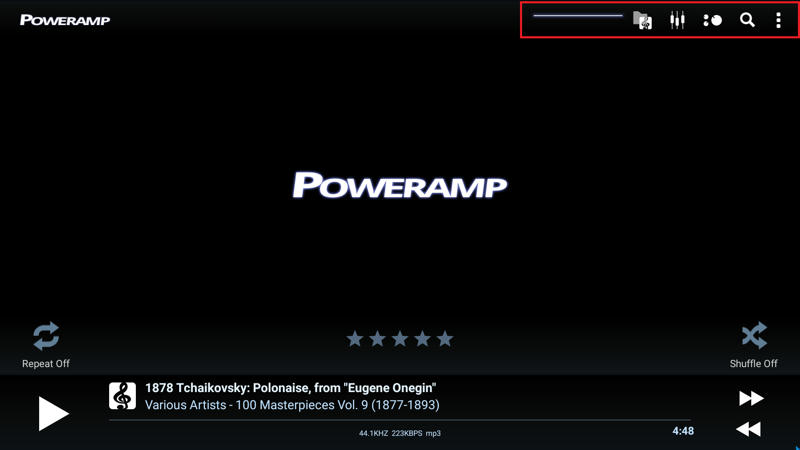
I have seen several Android applications that applications menu items are often clipped off.
For example, PowerAMP and Titanium backup. 
Such was not the problem at Himedia Q10 quad.

pcristi

  • Senior Member
  • ***
  • Posts: 1334
Re: Himedia Q10 Android application compatibility
« Reply #1 on: July 17, 2016, 11:49:56 AM »
Hello
This not HiMedia problem are application not compatible with TV box.

Run over adb shell, this will fix PowerAMP and Titanium backup, and maybe others
Code: [Select]
adb connect ip_player
adb remount
adb shell "busybox sed -i '/television/d' /etc/permissions/tablet_core_hardware.xml"

PS:
Himedia Q10 Quad(4K 3D) run in tablet mode
Himedia Q10 Pro is run in TV mode

I have seen several Android applications that applications menu items are often clipped off.
For example, PowerAMP and Titanium backup. 
Such was not the problem at Himedia Q10 quad.

eruo1

  • Newbie
  • *
  • Posts: 33
Re: Himedia Q10 Android application compatibility
« Reply #2 on: July 17, 2016, 12:09:28 PM »
How do you run over adb shell?

Thanks

mulholland2

  • Newbie
  • *
  • Posts: 3
Re: Himedia Q10 Android application compatibility
« Reply #3 on: July 17, 2016, 12:27:56 PM »
thank you, but how do I do this exactly? For example Poweramp

pcristi

  • Senior Member
  • ***
  • Posts: 1334
Re: Himedia Q10 Android application compatibility
« Reply #4 on: July 17, 2016, 02:16:33 PM »
Hi mulholland2
Because you ask about Titanium backup I suppose you have knowledge about android adb.

Option 1
- Download ADB Kits (525 KB) http://adbshell.com/upload/adb.zip
- Unpack adb.zip Ex: C:\adb
- Open command prompt, change folder to C:\adb
- run command from post up, where ip_player need to be replaced it media player ip Ex: 192.168.xxx.yyy

Option 2
Because you use Titanium backup your box is rooted
- install Terminal form Google Play  https://play.google.com/store/apps/details?id=jackpal.androidterm&hl=en
- open and run
Code: [Select]
su
busybox sed -i '/television/d' /etc/permissions/tablet_core_hardware.xml

Option 3
If box is rooted
- Use root explore to edit /etc/permissions/tablet_core_hardware.xml
- delete line
Code: [Select]
<feature name="android.hardware.type.television" />
LE: Poweramp --> this what will fix.


If you still need help send private message.
Respect Cristian

thank you, but how do I do this exactly? For example Poweramp
« Last Edit: July 17, 2016, 02:31:48 PM by pcristi »

mulholland2

  • Newbie
  • *
  • Posts: 3
Re: Himedia Q10 Android application compatibility
« Reply #5 on: July 17, 2016, 05:12:43 PM »
tank you very much, so it really works  :D

eruo1

  • Newbie
  • *
  • Posts: 33
Re: Himedia Q10 Android application compatibility
« Reply #6 on: July 17, 2016, 06:19:57 PM »
Thanks pchrist. It worked for me as well. Would you know how to fix location service?  All of my apps, such as google and gmail, show that the location service is not working for the unit. Thanks again.

pcristi

  • Senior Member
  • ***
  • Posts: 1334
Re: Himedia Q10 Android application compatibility
« Reply #7 on: July 17, 2016, 06:36:03 PM »
fix location service, this need to be done by some one with better knowledge of Android --> HiMedia/HiSilicon job.

eruo1

  • Newbie
  • *
  • Posts: 33
Re: Himedia Q10 Android application compatibility
« Reply #8 on: July 17, 2016, 09:15:56 PM »
Thanks again. When there is a fix. Please let me know.

Mount81

  • Senior Member
  • ***
  • Posts: 1097
Re: Himedia Q10 Android application compatibility
« Reply #9 on: July 18, 2016, 05:48:25 AM »
Same here, also strugling with the conroll of Poweramp, which is a bit uncheerful, cause it's one of the main applications that one wouldn't go without on Android. But I guess there will be many other applications that have this issue with TV Box mode...

The presumed problem with the fixing methods described above, is that if we switch that way to Tablet mode then the other TV Box optimized applications won't work properly...

So I would be glad if there would be an official and safe fix for this, that would include an all around compatibility (or an oiption to easily choose whether mode we want to use "even then"...

pcristi

  • Senior Member
  • ***
  • Posts: 1334
Re: Himedia Q10 Android application compatibility
« Reply #10 on: July 18, 2016, 08:53:03 AM »
@Mount81
Official and safe fix is every developer to fix application for television hardware.
HiMedia can't switch to table mode, their have licensing gms like television hardware.
To build official switch between television / table  is infringement of Google agreement.

Same here, also strugling with the conroll of Poweramp, which is a bit uncheerful, cause it's one of the main applications that one wouldn't go without on Android. But I guess there will be many other applications that have this issue with TV Box mode...

The presumed problem with the fixing methods described above, is that if we switch that way to Tablet mode then the other TV Box optimized applications won't work properly...

So I would be glad if there would be an official and safe fix for this, that would include an all around compatibility (or an oiption to easily choose whether mode we want to use "even then"...


DELIVERY ∙ PAYMENT ∙ WARRANTY+RETURNS ∙ INTERNATIONAL TAX ∙ ABOUT ∙ PRIVACY ∙ NEWS ∙ CONTACT
© SDHDIGITAL LTD 2026
SITEMAP