UK BASED ∙ UK STOCK ∙ ESTABLISHED 2010
2 YEAR WARRANTY ∙ FAST DELIVERY
EXPERT TECHNICAL SUPPORT
09-FEB UGOOS AM6B+ BACK IN STOCK   30-JAN ZIDOO 8K FIRMWARE UPDATE 1.3.05   5-JAN ARYLIC LP10 ADDS QOBUZ CONNECT  
This forum was closed in October 2025 in response to sustained DDOS type attacks. It has been left up read-only to allow access to support information and downloads. Thanks to all the users who contributed over the years.

Visit futeko.com for new Audio and Video Media Players!

Author Topic: Multiple problems with Q10 Pro  (Read 23708 times)

stack

  • Full Member
  • **
  • Posts: 79
Re: Multiple problems with Q10 Pro
« Reply #15 on: July 24, 2016, 09:56:45 AM »
What version of firmware you have?
Some people confirmed that USB3 Slave detection was fixed with 1.05 FW.
I didn't tried it yet.
I was using 1.05 I think. I tried to update over the air but it was saying my firmware was latest if that confirms it?

As I say it is boxed now so I can't really check.

You can check the version under Settings - About

mtenga

  • Newbie
  • *
  • Posts: 44
Re: Multiple problems with Q10 Pro
« Reply #16 on: July 24, 2016, 10:35:54 AM »
What version of firmware you have?
Some people confirmed that USB3 Slave detection was fixed with 1.05 FW.
I didn't tried it yet.
I was using 1.05 I think. I tried to update over the air but it was saying my firmware was latest if that confirms it?

As I say it is boxed now so I can't really check.

You can check the version under Settings - About

As I've posted its boxed and ready to go back.

As confirmed above USB Salve detection does not work properly under any firmware.

andys

  • Senior Member
  • ***
  • Posts: 128
Re: Multiple problems with Q10 Pro
« Reply #17 on: July 24, 2016, 11:52:09 AM »
only it works with usb 2.0 to pc

mtenga

  • Newbie
  • *
  • Posts: 44
Re: Multiple problems with Q10 Pro
« Reply #18 on: July 24, 2016, 12:51:28 PM »
only it works with usb 2.0 to pc
But there is no usb 2.0 slave connection! Don't know what you mean. As noted above the PC sees the drive fine just that the Q10 won't, with the cable connected.

One thing I noticed playing American Sniper was that Kodi played it fine with atmos, but the inbuilt media centre app buffered and skipped constantly  making it unwatchable. Don't understand why?

andys

  • Senior Member
  • ***
  • Posts: 128
Re: Multiple problems with Q10 Pro
« Reply #19 on: July 24, 2016, 01:17:26 PM »
HIMEDIA 3.0 slave, you must connect it to the PC with USB 2.0

mtenga

  • Newbie
  • *
  • Posts: 44
Re: Multiple problems with Q10 Pro
« Reply #20 on: July 24, 2016, 01:33:05 PM »
HIMEDIA 3.0 slave, you must connect it to the PC with USB 2.0

Do yo mean a USB 2.0 cable?

If so that would presumably kill the transfer speed.

I tend to believe the earlier explanation  from Danceswithchickens regarding override.

andys

  • Senior Member
  • ***
  • Posts: 128
Re: Multiple problems with Q10 Pro
« Reply #21 on: July 24, 2016, 02:25:06 PM »
it just so , for sure firmware problem..
you have to use your USB 3.0 cable , but it just goes on usb 2.0
http://www.futeko.com/newforum/index.php?topic=1047.0
I opened a thread

pcristi

  • Senior Member
  • ***
  • Posts: 1334
Re: Multiple problems with Q10 Pro
« Reply #22 on: July 24, 2016, 03:19:41 PM »
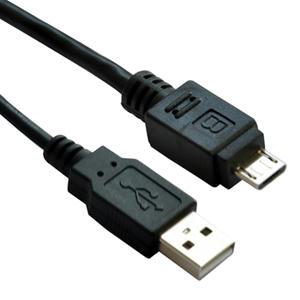
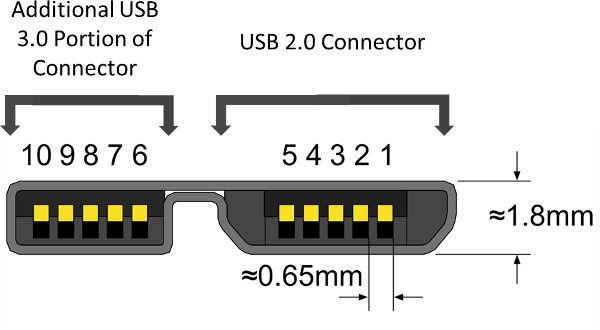
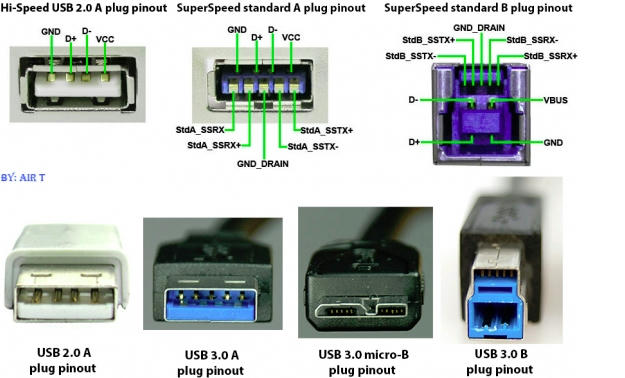
I suggest to connect with USB 2.0 B cable to  USB 2.0 PC inside off use USB 3.0 B cable to USB 2.0 PC port.
You lost advantage of  USB 3.0, but you have real chance to get working.

From softpedia  forum users:

Q: External HDD with micro USB 3.0 always connect/disconnected from Smart TV/mediaplayer
A:  Don't connect USB 3.0 cable to USB 2.0 port you have minimum chance to solved.
      Use external power with Y cable or a micro USB 2.0 cable
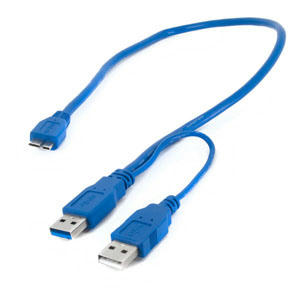


PS: Some models/revision of HDD never want to work with any mediaplayer or smart TV with USB 3.0 cable.

andys

  • Senior Member
  • ***
  • Posts: 128
Re: Multiple problems with Q10 Pro
« Reply #23 on: July 24, 2016, 03:32:23 PM »
there is talk that the USB 3.0 HIMEDIA slave does not do its duty, externally everything is ok

andys

  • Senior Member
  • ***
  • Posts: 128
Re: Multiple problems with Q10 Pro
« Reply #24 on: July 24, 2016, 03:56:59 PM »
The USB 3.0 cable type A and B should be fine as well , but the PC you have to attach it to the peripheral 2.0

pcristi

  • Senior Member
  • ***
  • Posts: 1334
Re: Multiple problems with Q10 Pro
« Reply #25 on: July 24, 2016, 03:59:15 PM »
I know, read again first two line of post.

USB 3.0 B vs USB 2.0 B cable.


I suggest to connect with USB 2.0 B cable to  USB 2.0 PC inside off use USB 3.0 B cable to USB 2.0 PC port.
You lost advantage of  USB 3.0, but you have real chance to get working.

there is talk that the USB 3.0 HIMEDIA slave does not do its duty, externally everything is ok

Nice Monkey

  • Senior Member
  • ***
  • Posts: 1140
  • Loves classic movies
Re: Multiple problems with Q10 Pro
« Reply #26 on: July 24, 2016, 04:41:13 PM »
And don't expect cables of 5 m length to work with USB3.

andys

  • Senior Member
  • ***
  • Posts: 128
Re: Multiple problems with Q10 Pro
« Reply #27 on: July 24, 2016, 04:54:08 PM »
And don't expect cables of 5 m length to work with USB3.

to me it worked I with a 80cm maximum , but I had problem that I fell for the PC System..
this device is the one that requires,I tried everything to no avail

Nice Monkey

  • Senior Member
  • ***
  • Posts: 1140
  • Loves classic movies
Re: Multiple problems with Q10 Pro
« Reply #28 on: July 25, 2016, 01:41:25 PM »
And don't expect cables of 5 m length to work with USB3.

to me it worked I with a 80cm maximum , but I had problem that I fell for the PC System..
this device is the one that requires,I tried everything to no avail

You may try an Active USB 3.0 cable (thanks to pcristy) from Lindy, Startech etc. These cables have a build in repeater to boost the signal strength.
Going 5m+ with these cables should work also with USB3.

ivanyc

  • Newbie
  • *
  • Posts: 18
Re: Multiple problems with Q10 Pro
« Reply #29 on: July 27, 2016, 06:20:02 AM »
try a total firmware upgrade of the system ie. a fresh install (pushing the pin behind).  If that doesnt work, try resetting your amp settings. 

I experienced no DTS HD audio in my system and discovered that it was the amp  that had to be factory reset, subsequently other audio issues on HIMEDIA that was resolved by performing full upgrade of firmware.


DELIVERY ∙ PAYMENT ∙ WARRANTY+RETURNS ∙ INTERNATIONAL TAX ∙ ABOUT ∙ PRIVACY ∙ NEWS ∙ CONTACT
© SDHDIGITAL LTD 2026
SITEMAP